App Loader Tutorial
KN5000 App Loader
The App Loader is a generic program launcher for the KN5000 keyboard. It replaces the HDAE5000 extension ROM with a custom loader that reads applications from a FAT16 hard disk, presents a menu, and launches selected apps into RAM. This enables running multiple homebrew programs without reflashing the extension ROM.
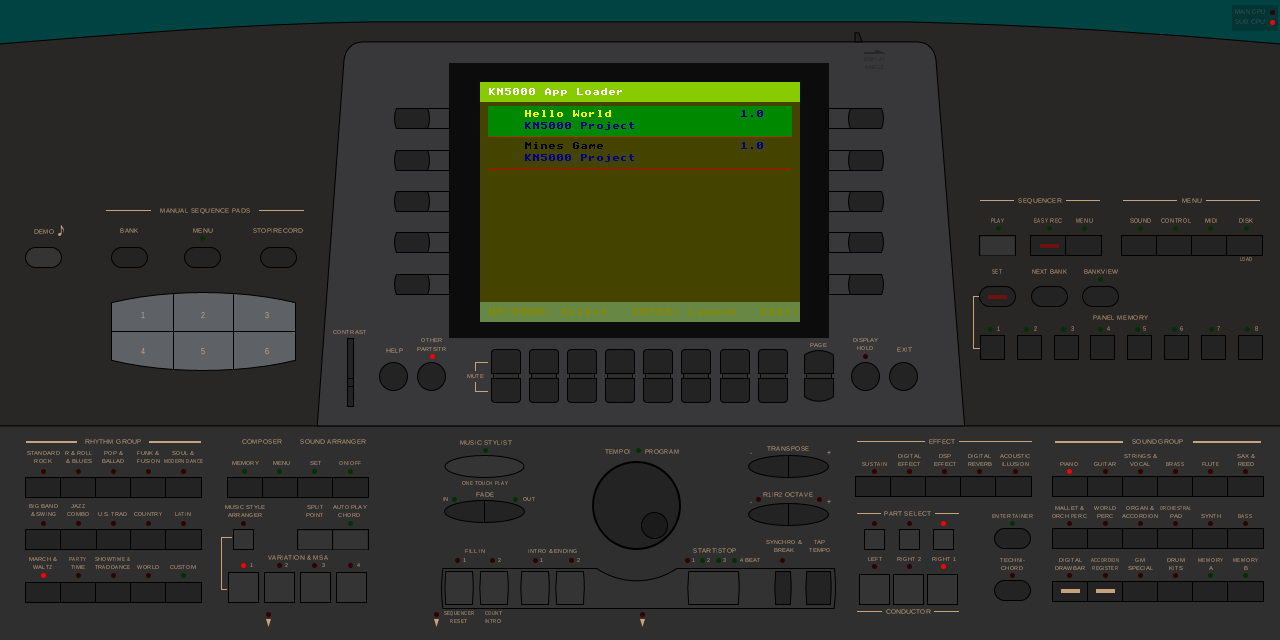 The App Loader menu running on the KN5000 in MAME, showing two installed applications: Hello World and Mines Game.
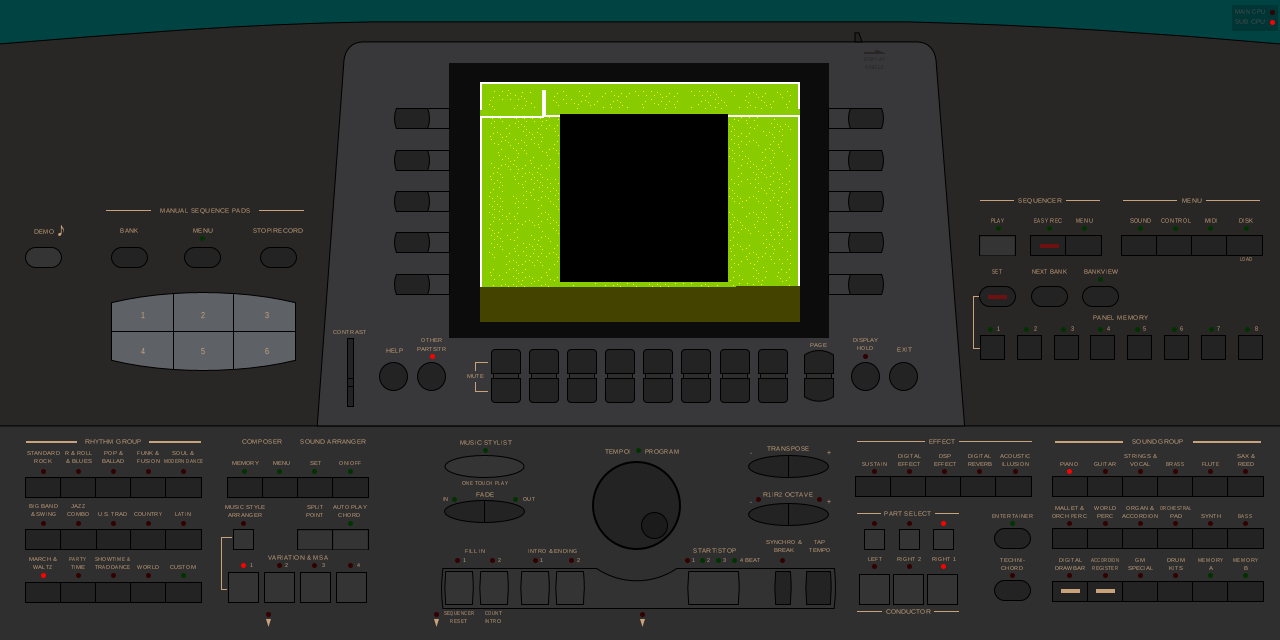 The Mines game running after being loaded from disk by the App Loader. The game binary was read from the FAT16 filesystem, loaded into RAM at 0x208000, and launched via its entry point.
How It Works
The App Loader is an HDAE5000 extension ROM that implements:
- ATA/IDE disk driver – reads sectors from the hard disk attached to the HDAE5000 extension board
- FAT16 filesystem driver – navigates directories and reads files from a standard FAT16 partition
- Application scanner – finds apps in the
/APPS/directory by reading theirAPP.INImanifests - Menu UI – displays a list of available apps with name, version, and author
- Program loader – loads the selected app’s
APP.BINinto RAM and transfers control to it
Architecture
Extension ROM (512KB @ 0x280000)         Hard Disk (FAT16)
+---------------------------+            +------------------+
| App Loader firmware       |            | /APPS/           |
| - XAPR header             |   ATA/IDE  |   /HELLO/        |
| - IDE driver              | <--------> |     APP.INI      |
| - FAT16 driver            |            |     APP.BIN      |
| - Menu UI                 |            |   /MINES/        |
| - Program loader          |            |     APP.INI      |
+---------------------------+            |     APP.BIN      |
                                         +------------------+
        |
        | loads APP.BIN to RAM
        v
Extension DRAM (512KB @ 0x200000)
+---------------------------+
| 0x200000: Loader state    |
| 0x208000: App code/data   |  <-- APP.BIN loaded here
| 0x27F000: App stack top   |
+---------------------------+
Cooperative Multitasking
The KN5000 firmware runs at 60Hz. The App Loader (and any loaded app) must cooperate with the firmware by yielding control every frame. This is done via a coroutine mechanism:
- Firmware calls the App Loader’s
Frame_Handleronce per frame - App Loader resumes the running app by restoring its saved stack pointer
- Running app calls
yield_to_firmware()to return control until the next frame - This cycle repeats at 60Hz, giving each party time to run
The key insight: the loaded app’s yield_to_firmware() uses the same shared addresses (SAVED_SP at 0x200044, APP_SAVED_SP at 0x200048) as the App Loader, forming a seamless coroutine chain: Firmware <-> App Loader <-> Running App.
Creating an Application
Each application lives in its own subdirectory under /APPS/ on the disk and contains two files:
/APPS/MYAPP/
    APP.INI     -- Application manifest (text file)
    APP.BIN     -- Application binary (flat binary, loaded to RAM)
APP.INI Manifest Format
The manifest is a plain text file with KEY=VALUE pairs, one per line:
NAME=My Application
VERSION=1.0
AUTHOR=Your Name
LOAD_ADDR=0x208000
ENTRY_OFFSET=0x0000
STACK_TOP=0x27F000
| Field | Required | Default | Description |
|---|---|---|---|
NAME |
Yes | – | Display name shown in the menu (max ~30 chars) |
VERSION |
No | (empty) | Version string shown next to the name |
AUTHOR |
No | (empty) | Author name shown below the app name |
LOAD_ADDR |
No | 0x208000 | RAM address where APP.BIN is loaded |
ENTRY_OFFSET |
No | 0x0000 | Offset from LOAD_ADDR to the entry point |
STACK_TOP |
No | 0x27F000 | Initial stack pointer for the app |
Lines starting with # or ; are treated as comments.
Memory Map for Apps
0x200000 +------------------+
         | Loader state     |  (don't touch: loader variables, buffers)
0x208000 +------------------+
         | APP.BIN loaded   |  <-- Your code + read-only data + initialized data
         | here             |
         |                  |
         | (up to ~448KB)   |
         |                  |
0x278000 +------------------+
         | (gap)            |
0x27F000 +------------------+
         | Stack (grows     |  <-- SP starts here
         | downward)        |
         +------------------+
Your app has approximately 448KB of contiguous RAM for code, data, and BSS. The stack grows downward from 0x27F000. Do not write to addresses below 0x208000 (that’s the App Loader’s state).
Startup Assembly
Your app needs a small assembly startup that:
- Saves the App Loader’s stack pointer (so you can return to it)
- Switches to your own stack
- Clears BSS (uninitialized globals)
- Calls your C
main()function - On return, restores the caller’s stack and returns
Here is a minimal startup (disk_startup.s):
.equ SAVED_SP,        0x200044    ; Firmware SP (shared with App Loader)
.equ APP_SAVED_SP,    0x200048    ; App SP (shared with App Loader)
.equ CALLER_SAVED_SP, 0x207FF0    ; Where we save App Loader's SP
.equ STACK_TOP,       0x27F000    ; Our stack

.globl _start
.globl yield_to_firmware

.section .startup, "ax", @progbits
_start:
        ; Save App Loader's stack pointer
        ld      xwa, xsp
        ld      (CALLER_SAVED_SP), xwa

        ; Switch to our own stack
        ld      xsp, STACK_TOP

        ; Clear BSS
        call    Clear_C_BSS

        ; Run the application
        call    main

        ; Restore App Loader's stack and return
        ld      xwa, (CALLER_SAVED_SP)
        ld      xsp, xwa
        ret

; Yield control back to firmware until next frame.
; Call this in your main loop to keep the system responsive.
yield_to_firmware:
        push    xwa
        push    xbc
        push    xde
        push    xhl
        push    xix
        push    xiy
        push    xiz
        ld      xwa, xsp
        ld      (APP_SAVED_SP), xwa     ; Save our SP
        ld      xwa, (SAVED_SP)         ; Load firmware SP
        ld      xsp, xwa
        pop     xiz
        pop     xiy
        pop     xix
        pop     xhl
        pop     xde
        pop     xbc
        pop     xwa
        ret                             ; Return to firmware

Clear_C_BSS:
        push    xwa
        push    xbc
        push    xde
        ld      xwa, __bss_start
        ld      xbc, __bss_size
        ld      xde, 0
        cp      xbc, 0
        jr      z, .Ldone
.Lloop: ld      (xwa), xde
        add     xwa, 4
        sub     xbc, 4
        jr      nz, .Lloop
.Ldone: pop     xde
        pop     xbc
        pop     xwa
        ret
Linker Script
Use this linker script (disk.ld) to place everything at the correct RAM address:
MEMORY {
  APP (rwx) : ORIGIN = 0x208000, LENGTH = 448K
}

ENTRY(_start)

SECTIONS {
  .startup 0x208000 : { *(.startup) } > APP
  .text    : { *(.text*) } > APP
  .rodata  : { *(.rodata*) } > APP
  .data    : {
    __data_start = .;
    *(.data*)
    . = ALIGN(4);
    __data_end = .;
  } > APP

  __data_load = __data_start;
  __data_size = 0;  /* No ROM-to-RAM copy needed */

  .bss (NOLOAD) : {
    __bss_start = .;
    *(.bss*)
    *(COMMON)
    . = ALIGN(4);
    __bss_end = .;
  } > APP

  __bss_size = __bss_end - __bss_start;

  /DISCARD/ : { *(.comment) *(.note*) *(.eh_frame*) }
}
Since the entire binary is loaded directly to its runtime address by the App Loader, there is no ROM-to-RAM data copy needed (__data_size = 0).
C Code Structure
Your C code should follow this pattern:
/* Declare yield_to_firmware (defined in assembly) */
extern void yield_to_firmware(void);

/* VRAM base address */
#define VRAM_BASE 0x1A0000

/* Your main function */
int main(void)
{
    /* Initialize your app (clear screen, set palette, etc.) */

    /* Main loop */
    while (1) {
        /* Handle input */

        /* Update game state */

        /* Render to VRAM */

        /* IMPORTANT: yield to firmware every frame */
        yield_to_firmware();
    }

    /* Return to App Loader menu */
    return 0;
}
The call to yield_to_firmware() is essential – it returns control to the KN5000 firmware for one frame (~16.7ms at 60Hz). Without it, the firmware will hang and the keyboard will be unresponsive.
Makefile
Here is a template Makefile for building a disk app:
LLVM_BIN := /path/to/llvm-project/build/bin
CLANG := $(LLVM_BIN)/clang
LLC := $(LLVM_BIN)/llc
OBJCOPY := $(LLVM_BIN)/llvm-objcopy
LLVM_LINK := $(LLVM_BIN)/llvm-link
LLD := $(LLVM_BIN)/ld.lld
LLD_ENV := LD_LIBRARY_PATH=$(LLVM_BIN)/../lib

BUILD_DIR := build

CFLAGS := -target tlcs900 -ffreestanding -nostdlib -O2 -Iinclude
LLC_FLAGS := -mtriple=tlcs900 -mcpu=tmp94c241 -O2

# Compile C to LLVM IR
$(BUILD_DIR)/%.ll: %.c | $(BUILD_DIR)
	$(CLANG) $(CFLAGS) -S -emit-llvm -o $@ $<

# Link IR modules
$(BUILD_DIR)/all_c.ll: $(BUILD_DIR)/main.ll
	$(LLVM_LINK) -S -o $@ $^

# Compile IR to object
$(BUILD_DIR)/all_c.o: $(BUILD_DIR)/all_c.ll
	$(LLC) $(LLC_FLAGS) -filetype=obj -o $@ $<

# Assemble startup
$(BUILD_DIR)/startup.o: disk_startup.s | $(BUILD_DIR)
	$(CLANG) -target tlcs900 -mcpu=tmp94c241 -c -o $@ $<

# Link
$(BUILD_DIR)/app.elf: $(BUILD_DIR)/startup.o $(BUILD_DIR)/all_c.o disk.ld
	$(LLD_ENV) $(LLD) -T disk.ld -o $@ $(BUILD_DIR)/startup.o $(BUILD_DIR)/all_c.o

# Extract flat binary
$(BUILD_DIR)/APP.BIN: $(BUILD_DIR)/app.elf
	$(OBJCOPY) -O binary $< $@

$(BUILD_DIR):
	mkdir -p $@

.PHONY: clean
clean:
	rm -rf $(BUILD_DIR)
Building the Disk Image
Applications are distributed on a FAT16 hard disk image. The App Loader includes a Python script (tools/create_disk.py) that creates a properly formatted disk image.
Disk Image Structure
Sector 0:     MBR (Master Boot Record with partition table)
Sector 1+:    FAT16 partition
              +-- Boot sector (BPB)
              +-- FAT tables (x2)
              +-- Root directory
              +-- Data area
                  +-- /APPS/ directory
                      +-- /APPS/HELLO/APP.INI, APP.BIN
                      +-- /APPS/MINES/APP.INI, APP.BIN
                      +-- /APPS/MYAPP/APP.INI, APP.BIN
Adding Your App to the Disk
To add a new application to the disk image, modify tools/create_disk.py. Follow the pattern used for HELLO and MINES:
- Create a subdirectory cluster under
/APPS/ - Write the
APP.INImanifest - Write the
APP.BINbinary
Or, for simpler workflows, mount the raw disk image and copy files directly:
# Mount the raw image (Linux, requires root)
sudo mount -o loop,offset=512 build/apploader_disk.img /mnt/disk
sudo mkdir -p /mnt/disk/APPS/MYAPP
sudo cp APP.INI /mnt/disk/APPS/MYAPP/
sudo cp build/APP.BIN /mnt/disk/APPS/MYAPP/
sudo umount /mnt/disk
Note: The offset of 512 skips the MBR sector to reach the FAT16 partition.
Testing in MAME
Prerequisites
- MAME with the KN5000 driver (including HDAE5000 extension slot and ATA support)
- Original KN5000 ROM dumps
- The App Loader ROM (
build/apploader.bin, 512KB) - A disk image with your app (
build/apploader_disk.hd)
Building Everything
cd custom-kn5000-roms/apploader

# Build the App Loader ROM and disk image
make all

# This produces:
#   build/apploader.bin       -- Extension ROM (512KB)
#   build/apploader_disk.hd   -- FAT16 disk image (~16MB)
#   custom_kn5000_roms/apploader/kn5000/  -- Complete MAME ROM set
Running MAME
Interactive mode (recommended for development):
make test-interactive
This runs MAME with the App Loader ROM in the HDAE5000 extension slot and the disk image attached as an IDE hard drive.
Automated mode (for CI/testing):
make test
This runs MAME for 120 seconds with -skip_gameinfo to bypass startup dialogs.
The underlying MAME command is:
mame kn5000 \
    -rompath /path/to/custom_kn5000_roms/apploader \
    -extension hdae5000 \
    -hard build/apploader_disk.hd \
    -window -ui_active -oslog
Activating the App Loader
The App Loader activates when the firmware sends the DISK MENU event (0x01C00008). In MAME:
- Wait for the keyboard to boot (~30 seconds)
- Press the DISK button on the front panel (top-right area)
- The App Loader menu should appear on the LCD
For automated testing via Lua scripts, you can force activation by writing directly to the loader’s active flag:
-- Write 1 to LOADER_ACTIVE (0x200000) after firmware boots
local cpu = manager.machine.devices[":maincpu"]
local mem = cpu.spaces["program"]
mem:write_u8(0x200000, 1)
Menu Navigation
| Button | Action |
|---|---|
| RIGHT UP (CPR SEG4, bit 1) | Move selection up |
| RIGHT DOWN (CPR SEG4, bit 5) | Move selection down |
| LEFT ENTER (CPL SEG4, bit 0) | Launch selected app |
| LEFT EXIT (CPL SEG7, bit 3) | Exit App Loader |
Disk Image Format
The App Loader requires a raw disk image with .hd extension. CHD (Compressed Hunks of Data) format does not work correctly with the HDAE5000 ATA device – MAME returns raw CHD header bytes instead of decompressed sector data. Always use raw images.
Worked Example: Mines Game
The Mines (Minesweeper) game is the first real application to run on the App Loader. Here’s how it was built:
1. Build the Mines disk binary
cd Mines/platforms/kn5000
make disk
# Produces: build/mines_disk.bin (14KB)
This builds Mines with a disk-specific startup (disk_startup.s) and linker script (disk.ld) that target RAM at 0x208000 instead of the extension ROM address.
2. Create the disk image
cd custom-kn5000-roms/apploader
make disk
# Produces: build/apploader_disk.hd with /APPS/MINES/APP.BIN
The create_disk.py script automatically picks up the Mines binary and creates the disk image.
3. Run in MAME
make test-interactive
# Boot the keyboard, press DISK, navigate to Mines, press ENTER
Key Design Decisions
-
Shared coroutine addresses: The Mines game’s
yield_to_firmware()uses the same SAVED_SP/APP_SAVED_SP addresses (0x200044/0x200048) as the App Loader. This means the firmware doesn’t know the difference between the App Loader and the Mines game – both participate in the same cooperative multitasking scheme. -
No XAPR header: Unlike the extension ROM approach, disk apps don’t need an XAPR header. They’re plain flat binaries loaded to RAM.
-
Self-contained binary: The disk binary includes all code, read-only data (tiles, palette), and initialized data in a single flat binary. BSS is zeroed by the startup code.
Source Code
The App Loader source code is available at:
- App Loader:
custom-kn5000-roms/apploader/ - Mines disk build:
Mines/platforms/kn5000/(seedisk_startup.s,disk.ld, and thediskMakefile target)
Related Pages
- HDAE5000 Homebrew Development – Extension ROM protocol, XAPR header, build pipeline
- HDAE5000 Hardware – Extension board hardware details
- HDAE5000 Filesystem – FAT16 filesystem internals
- Storage Subsystem – IDE/ATA hardware interface
- Event Codes – Firmware event dispatch system
- Memory Map – Full KN5000 address space