Image Gallery
Embedded Image Gallery
Images extracted from the KN5000 firmware ROMs. These graphics are displayed on the built-in LCD screen (320x240 pixels, controlled by IC206 MN89304).
Feature Demo Images (Table Data ROM)
These BMP images are used in the keyboard’s feature demonstration mode.
System Update Bitmaps
The Table Data ROM also contains 8 system update message bitmaps at address 0x9FA156. These are the same images as the Main CPU ROM system update bitmaps - both ROMs share identical bitmap data.
| Address | Image | Purpose |
|---|---|---|
| 0x9FA156 | Flash Memory Update | Update in progress |
| 0x9FA3BE | Now Erasing | Flash erase in progress |
| 0x9FA626 | FD to Flash Memory | Copying from floppy |
| 0x9FA88E | Completed | Operation complete |
| 0x9FAAF6 | Please Wait | Processing |
| 0x9FAD5E | Change FD 2 of 2 | Multi-disk prompt |
| 0x9FAFC6 | Illegal Disk | Invalid disk error |
| 0x9FB22E | Turn On AGAIN | Restart instruction |
Note: The Table Data ROM uses 16-bit word-level interleaving (stored across two physical ROM chips: odd.ic1 and even.ic3). When properly combined, the bitmap data is byte-identical to the Main CPU versions. The disassembly source shares the same bitmap files between both ROMs.
FTBMP01 - Technics Logo + World Globe (FTDEMO_SCREEN01_TECHNICS_GLOBE)

320x240, 8-bit color — The Technics brand logo overlaid on a world globe graphic. Used as the opening image of the Feature Demo presentation.
FTBMP02 - Subwoofers (FTDEMO_SCREEN02_SUBWOOFERS)
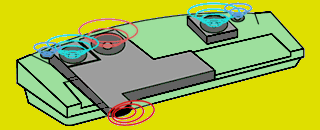
320x130, 8-bit color — A showcase image of the KN5000’s integrated subwoofer speakers.
FTBMP03 - Floppy Disks (FTDEMO_SCREEN03_FLOPPY_DISKS)
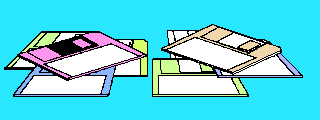
320x120, 8-bit color — A collection of floppy disks, highlighting the keyboard’s built-in floppy drive.
FTBMP04 - Disk Insertion (FTDEMO_SCREEN04_DISK_INSERT)
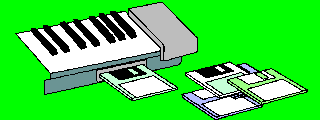
320x120, 8-bit color — A floppy disk being inserted into the KN5000’s drive slot.
FTBMP05 - 360° Surround Arrows (FTDEMO_SCREEN05_SURROUND_ARROWS)

320x125, 8-bit color — Arrows arranged in a 360° pattern, representing the keyboard’s surround sound capabilities.
FTBMP06 - KN5000 + Rainbow Comet (FTDEMO_SCREEN06_KN5000_RAINBOW)
320x240, 8-bit color — The KN5000 model name with a rainbow comet graphic. Used as the closing image of the Feature Demo presentation.
Note: All six FTBMP images reside on floppy disk (not in ROM). The “IN COLOR” text visible in the Feature Demo splash screen is pre-rendered directly into these bitmap files. Disassembly symbols: FTDEMO_SCREEN01_TECHNICS_GLOBE through FTDEMO_SCREEN06_KN5000_RAINBOW.
Main CPU ROM Images
These images were extracted from raw bitmap data in the main CPU ROM and converted to PNG.
Status Messages (1-bit bitmaps, 224x22 pixels)
| Image | Filename | Purpose |
|---|---|---|
 |
Bitmap_1bit_Flash_Memory_Update.bin |
Flash Memory Update message |
 |
Bitmap_1bit_Now_Erasing.bin |
Now Erasing message |
 |
Bitmap_1bit_FD_to_Flash_Memory.bin |
FD to Flash Memory message |
 |
Bitmap_1bit_Completed.bin |
Completed message |
 |
Bitmap_1bit_Please_Wait.bin |
Please Wait message |
 |
Bitmap_1bit_Change_FD_2_of_2.bin |
Change FD 2 of 2 message |
 |
Bitmap_1bit_Illegal_Disk.bin |
Illegal Disk error |
 |
Bitmap_1bit_Turn_On_AGAIN.bin |
Turn On AGAIN instruction |
Logos
| Image | Filename | Dimensions | Description |
|---|---|---|---|
 |
BitmapTechnicsLogo.bin |
312x45, 8-bit | Technics brand logo |
 |
BitmapKN5000Logo.bin |
200x36, 8-bit | KN5000 model logo |
Split Point Indicators (58x52 pixels, 8-bit)
These images show keyboard split point notes displayed when configuring the keyboard split.
| Image | Note |
|---|---|
 |
C |
 |
Db |
 |
D |
 |
Eb |
 |
E |
 |
F |
 |
Gb |
 |
G |
 |
Ab |
 |
A |
 |
Bb |
 |
B |
 |
No Split |
Drawbar Sliders (22x222 pixels, 8-bit)
| Image | Filename | Description |
|---|---|---|
 |
BitmapDrawbarNumberedSlider_1.bin |
Drawbar slider 1 |
 |
BitmapDrawbarNumberedSlider_2.bin |
Drawbar slider 2 |
 |
BitmapDrawbarNumberedSlider_3.bin |
Drawbar slider 3 |
MIDI Connection Diagrams (296x108 pixels, 8-bit)
| Image | Filename | Description |
|---|---|---|
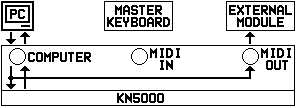 |
BitmapMIDIConnections_1.bin |
MIDI connections diagram 1 |
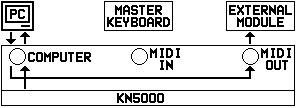 |
BitmapMIDIConnections_2.bin |
MIDI connections diagram 2 |
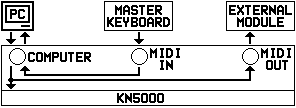 |
BitmapMIDIConnections_3.bin |
MIDI connections diagram 3 |
UI Elements
| Image | Filename | Dimensions | Description |
|---|---|---|---|
 |
BitmapWormWearingHat.bin |
24x24, 8-bit | Easter egg - worm wearing hat |
 |
BitmapSomeArrows.bin |
294x6, 8-bit | Arrow icons strip |
Transition Effects
| Image | Filename | Dimensions | Description |
|---|---|---|---|
 |
BitmapFadeInPicture.bin |
112x25, 8-bit | Fade in picture effect |
 |
BitmapFadeOutPicture.bin |
114x25, 8-bit | Fade out picture effect |
 |
BitmapFadeInText.bin |
80x18, 8-bit | Fade in text effect |
 |
BitmapFadeOutText.bin |
108x20, 8-bit | Fade out text effect |
Accompaniment & Edit Graphics
| Image | Filename | Dimensions | Description |
|---|---|---|---|
 |
BitmapAccger16.bin |
120x95, 8-bit | Accompaniment graphic (German) |
 |
BitmapAccita16.bin |
120x95, 8-bit | Accompaniment graphic (Italian) |
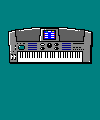 |
BitmapBmphk.bin |
100x120, 8-bit | Unknown graphic |
 |
BitmapDredt0d.bin |
168x119, 8-bit | Unknown graphic |
 |
BitmapDredt0k.bin |
88x119, 8-bit | Unknown graphic |
 |
BitmapNtedt0d.bin |
240x127, 8-bit | Note edit graphic |
 |
BitmapNtedt0k.bin |
127x16, 8-bit | Note edit graphic small |
HDAE5000 Hard Disk Expansion ROM Images
These images were extracted from the HD-AE5000 hard disk expansion ROM. The images are 8-bit indexed color, displayed on the KN5000’s LCD during HD-AE5000 operations.
Palette discovery: Disassembly analysis found the boot code at 0x28f585 loads palette data from ROM offset 0x65dce. The icon uses a separate Windows halftone-style palette at 0x6158e.
HD-AE5000 Product Logo
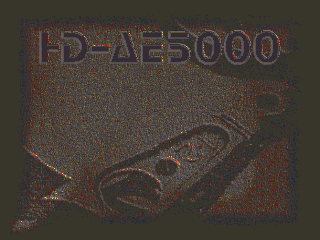
320x240, 8-bit indexed color - ROM offset: 0x2898e (CPU: 0x2A898E)
Shows the HD-AE5000 product name with a stylized hard disk drive graphic.
Hands Operating HD-AE5000
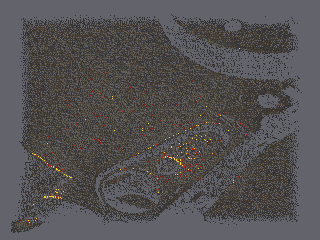
320x240, 8-bit indexed color - ROM offset: 0x3b98e (CPU: 0x2BB98E)
Promotional image showing hands operating the HD-AE5000 unit connected to a KN5000 keyboard.
File Selection Panel
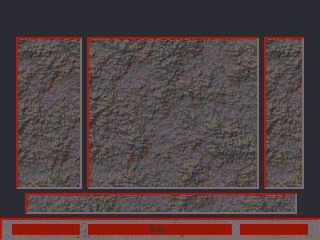
320x240, 8-bit indexed color - ROM offset: 0x4e98e (CPU: 0x2CE98E)
UI panel showing file selection interface with textured button areas.
Hard Disk Icon

28x28, 8-bit indexed color - ROM offset: 0x6198e (CPU: 0x2E198E)
Small icon depicting a hard disk with magnetic head, used in UI elements.
Preset Wallpapers (Table Data ROM)
These background wallpapers are built into the firmware for the LCD display. Discovered via the SetWallPaper routine which references a wallpaper table at 0xEAAE62.
Technical details:
- Format: 320×240 pixels @ 8bpp (76,800 bytes each)
- Uses the standard KN5000 256-color palette
- The wallpaper table has 6 entries, but only entries 0-1 point to ROM data; entries 2-4 point to RAM addresses for user-loaded wallpapers
Wallpaper 0 - Blue Texture

320x240, 8-bit indexed color - Table Data ROM offset: 0x8ED000-0x8FFC00
Blue textured pattern resembling fabric or carpet.
Wallpaper 1 - Technics Branded

320x240, 8-bit indexed color - Table Data ROM offset: 0x900000-0x912C00
Blue textured pattern with subtle “Technics” watermark.
Wallpaper Routine Details
The wallpaper system uses multiple name getter routines for displaying wallpaper names in the UI:
| Routine | Address | Purpose |
|---|---|---|
WP_GetConfigName |
0xF8EDD2 | Get name from config at 0x1ED350 |
WP_GetNameByOffset |
0xF8EE00 | Get name with calculated offset |
WP_GetPresetName1 |
0xF8EE30 | Lookup from ROM table 0xEA07AE |
WP_GetPresetPtr |
0xF8EE56 | Simple pointer lookup from 0xEA07EA |
WP_GetBankMemName |
0xF8EE65 | Get name with bank/memory selection |
WP_GetPresetName3 |
0xF8EEB5 | Lookup from ROM table 0xEA08DA |
WP_GetUserName1 |
0xF8EEDB | Get from structure at 0x1E0000 |
WP_GetUserName2 |
0xF8EF08 | Get from RAM at 0x1E4980 |
WP_GetUserName3 |
0xF8EF2C | Get from 0x1E4AA7 |
UI Icons (Table Data ROM)
The KN5000 uses 176 small icons for menu items and UI elements. These were discovered by analyzing the DrawIcons routine at 0xFABF9B.
Technical details:
- Icon table at
0x938000(Table Data ROM offset0x138000) - All 176 icons are 24×24 pixels @ 4bpp (288 bytes each)
- The
DrawIconsroutine has hardcoded loops: 12 bytes/row × 24 rows - The “dims” field in the table is the UI bounding box (for hit testing), NOT pixel dimensions
- 4bpp format: 2 pixels per byte (high nibble first, low nibble second)
- 16-color CGA/EGA-style palette from main ROM at
0xEB37DE
Color Palette:
| Nibble | Palette Index | Color |
|---|---|---|
| 0 | 0x00 | Black |
| 1 | 0x01 | Dark Red |
| 2 | 0x02 | Dark Green |
| 3 | 0x03 | Olive |
| 4 | 0x04 | Dark Blue |
| 5 | 0x05 | Dark Magenta |
| 6 | 0x06 | Dark Cyan |
| 7 | 0x07 | Light Gray (background) |
| 8 | 0xF8 | Dark Gray |
| 9 | 0xF9 | Bright Red |
| 10 | 0xFA | Bright Green |
| 11 | 0xFB | Yellow |
| 12 | 0xFC | Bright Blue |
| 13 | 0xFD | Magenta |
| 14 | 0xFE | Cyan |
| 15 | 0xFF | White |
Icon Sprite Sheet
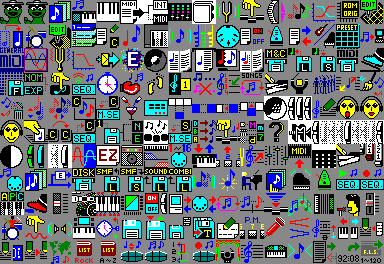
384x264 pixels - all 176 icons arranged in 16 columns × 11 rows
The sprite sheet shows all 24×24 pixel icons. Icon IDs are numbered left-to-right, top-to-bottom starting from 0. Known icons include:
- Icon 0-1: Document/file icons
- Icon 7: Appears to be related to Easter egg (worm reference in code)
Icons with Non-Standard Bounding Boxes
Three icons have larger bounding boxes for UI hit-testing purposes, but still use standard 24×24 pixel data:
| Icon | Bounding Box | Notes |
|---|---|---|
| 173 | 27×27 | Standard 24×24 pixel data |
| 174 | 27×27 | Standard 24×24 pixel data |
| 175 | 28×28 | Standard 24×24 pixel data |
Icon Table Structure
Each icon table entry is 8 bytes:
| Offset | Size | Description |
|---|---|---|
| 0 | 2 | Bounding box width (for UI hit testing, NOT pixel width) |
| 2 | 2 | Bounding box height (for UI hit testing, NOT pixel height) |
| 4 | 4 | Pointer to pixel data in ROM |
Most icons have bounding box 0x18 × 0x18 (24×24). The DrawIcons routine ignores these values for rendering - it always draws 24×24 pixels using hardcoded loops (12 bytes/row × 24 rows).
Image Format Notes
- Table Data BMP: Standard Windows BMP format, 8-bit indexed color
- Main CPU raw: Custom format, raw pixel data without headers, uses RGBA palette at
0xEB37DE - HDAE5000 raw: Raw pixel data, main images use palette at ROM offset
0x65dce, icon uses halftone palette at0x6158e - 1-bit bitmaps: Monochrome, 224x22 pixels (28 bytes per row) - shared between Main CPU and Table Data ROMs
- 8-bit bitmaps: 256-color indexed, dimensions vary by image
- LCD resolution: 320x240 pixels (QVGA)
- LCD controller: MN89304 with 4Mbit Video RAM (IC207)
Cross-ROM Shared Graphics
Analysis found ~39 KB of near-identical graphics data shared between the Main CPU Program ROM and Table Data ROM. These are not exact duplicates — they match 89-96% at the byte level, with differences primarily in adjacent byte ordering (suggesting different rendering passes of the same source artwork).
| Main CPU Image | Main CPU Address | Table Data Address | Size | Match |
|---|---|---|---|---|
| BitmapTechnicsLogo (tail) | 0xE90090 | 0x91D0EA | 13,806 B | 93.5% |
| BitmapKN5000Logo (tail) | 0xE93680 | 0x82CDA4 | 7,198 B | 89.8% |
| BitmapBmphk (tail) | 0xE7C8B0 | 0x921176 | 9,282 B | 95.9% |
| FadeIn/FadeOut bitmaps | 0xEB8190 | 0x809AD6 | 8,964 B | 94.3% |
Conclusion: Because the copies are not byte-identical, sharing via binclude is not feasible. Both ROMs were compiled independently with their own bitmap rendering, resulting in near-identical but distinct binary representations of the same visual content.
Converting New Images
When new images are extracted as .bin files:
- Add metadata to
convert_images.pyin the ROM disassembly repo - Run
make galleryto convert and copy to this site - Update this page with the new images
- Commit both repositories together
See Reverse Engineering - Embedded Images for the extraction workflow.