HDAE5000 Hard Disk Expansion
HD-AE5000 Hard Disk Expansion
The HD-AE5000 is an optional hard disk expansion for the KN5000 that provides 1.08GB storage for music files. This page documents the reverse engineering of its firmware.
Overview
| Property | Value |
|---|---|
| ROM File | hd-ae5000_v2_06i.ic4 |
| ROM Size | 512KB |
| Base Address | 0x280000 |
| Firmware Version | 2.33J (file version “V2.06i”) |
| Development Period | Juli-Oktober 1996 |
| Author | M. Kitajima |
| Developers | Technosoft (CH-Samstagern), Pointstyle (CH-Buttisholz) |
| Languages | English, German, French (Latin-1 encoding) |
The HDAE5000 firmware runs on the main CPU (TMP94C241F) when the expansion is present. It provides hard disk management, PC communication via parallel port, and file transfer capabilities.
August 2026 correction. Four disassembly packages (commits
db26eca,b893ee8,b7752bc,abdf0ea) rewrote the second half of this ROM’s map. The short version: the 413,907-byte blob whose file is still namedcode_29af2d_2fffff.binis, past its first 3 KB, not code. It is bitmaps, palettes, text and pointer tables. The old labelHDAE5000_Font_Datahas been retired — there is no font there — and several regions that the disassembler had rendered as instructions (long runs ofnop) were 0x00 string padding. Sections below marked (corrected) replace earlier text on this page.
Hardware Interface
Physical Connection
The HD-AE5000 connects to the KN5000 main board via cable W3 (part number QEX0ZA34008). The connector is labeled “HSQ(OPTION)” on the main PCB block diagram (service manual page II-3) and “FOR H.D. (OPTION)” on the wiring connection diagram (page II-1).
The expansion interface provides:
- Address bus access (main CPU address space)
- Data bus access (16-bit D0-D15)
- PPI chip select (PPPCS) for the 8255-compatible PPI at 0x160000
- HD control signals (HDOCS, HDRDY, HSQRAM)
- Power (+5V, GND)
- Presence detection line (active low, directly from PE port bit 0)
Note: The KN5000 service manual (EMID971655) does not include a dedicated HDAE5000 schematic page. The HD-AE5000 is documented as an option, and its internal schematic (PPI, ROM, IDE controller, parallel port) would require a separate HD-AE5000 service manual or physical board examination. The signal names above are derived from the main board schematic and firmware analysis.
Main CPU Bus Signals
The following HDAE5000-related signals appear on the main board schematic (CPU Section A, page II-11):
| Signal | Direction | Description |
|---|---|---|
| PPPCS | Output (Main CPU) | PPI chip select (directly decoded from address bus for 0x160000) |
| HDOCS | Output (Main CPU) | HD option chip select |
| HDRDY | Input (from HD) | HD ready status |
| HSQRAM | Control | HD SQRAM signal (address space qualifier) |
| D0-D15 | Bidirectional | 16-bit data bus |
| A0-A18 | Output (Main CPU) | Address bus (subset) |
| PE.0 | Input (from HD) | Presence detection (active low) |
PPI (8255) at 0x160000
The main CPU communicates with the HDAE5000 hardware via an Intel 8255-compatible Programmable Peripheral Interface (NEC uPD71055 on the HD-AE5000 board).
| Address | Port | Direction | Function |
|---|---|---|---|
| 0x160000 | Port A | Output | Data output to HD controller |
| 0x160002 | Port B | Input | Status input from HD controller |
| 0x160004 | Port C | Output | Control signals (strobe, handshake) |
| 0x160006 | Control | Write | PPI configuration (0x82) |
PPI Control Register Configuration (0x82):
- Bit 7 = 1: Mode set active
- Port A: Mode 0, Output
- Port B: Mode 0, Input
- Port C: Output (both nibbles)
Presence Detection
The HD-AE5000 presence is detected via PE port bit 0 (active low):
BIT 0, (PE)           ; Check PE port bit 0
JR NZ, skip_hdae      ; If set, HD-AE5000 NOT present
ROM Entry Points
The HDAE5000 ROM has two primary entry points called by the main CPU firmware:
| Address | Function | Target | Description |
|---|---|---|---|
| 0x280008 | Boot Init | JP 0x28F576 | Called during system initialization |
| 0x280010 | Frame Handler | JP 0x28F662 | Called each frame for PPORT polling |
Boot Initialization (0x28F576) (corrected)
Called once during system startup if HDAE5000 is detected. The initialization sequence:
- Clear work buffer and load .data -
HDAE5000_Clear_Work_Buffer(0x28F785) zeroes 0xF52A bytes at0x22A000and copies the 0x0C82-byte initialised-data image from ROM0x2F94B2to RAM0x23952A(see Initialised .data image) - Store workspace pointer - saves the main CPU workspace address (passed in XWA) at
0x23A1A2 - Register handlers -
HDAE5000_Handler_Registration(0x280020) registers 11 callbacks with the main CPU’s object dispatch system - Load the boot palette -
lda XWA,0x2E5DCE, thenHDAE5000_Load_Palettewrites all 256 entries to the VGA DAC - Blit the boot splash into VRAM - queries the splash’s resource descriptor for its base (
0x2E61CE), then copies it into VRAM as two 0x9600-byte halves, to0x1A0000and0x1A9600 - Register the DISK MENU entry - calls workspace[0x0E0A][0x02C4] with menu group 0x600002, writes
0x016A0005into slot+0x00 (handler 0x016A, record 5 =HDTitleMenu) and the “HD-AE5000” string pointer0x2F8DCEinto slot+0x2A - Initialize callback pointers - three calls through workspace[0x0E88] store callbacks at
0x230ECC,0x230ED2,0x230ED6 - Check HD presence -
HDAE5000_Check_HD_Present(0x2971A3); result stored at0x230EDA - Initialize HD - if present, a full init through workspace[0x0E0A][0x0124]
- Register frame handler -
HDAE5000_Register_Frameat0x2803C2
Step 5 was previously described on this page as “copies 76,800 bytes to work areas” with no statement of what the data was, and the disassembly’s own comment had the copy direction backwards. It is a screen blit: 0x1A0000 is the linear 320×240 8bpp framebuffer (see Display Subsystem), 0x9600 = 38,400 bytes = 120 rows, and the two destinations are adjacent, so the two copies paint the top and bottom halves of one full screen. The picture is the boot splash.
Key RAM Variables
| Address | Name | Purpose |
|---|---|---|
| 0x22A000 | HDAE5000_WORK_BUFFER | Work buffer (0xF52A bytes, cleared at init) |
| 0x23952A | HDAE5000_Init_Data (RAM copy) | Destination of the 0x0C82-byte .data image |
| 0x23A19E | HDAE5000_WORKSPACE_PTR2 | Secondary workspace pointer (starts 0xFFFFFFFF) |
| 0x23A1A2 | HDAE5000_WORKSPACE_PTR | Pointer to main workspace structure |
| 0x230EC2 | HDAE5000_WORK_TEMP | Temporary work variable |
| 0x230EC4 | HDAE5000_STATE_VAR | State variable |
| 0x230EC6 | HDAE5000_CALC_RESULT | Calculation result storage |
| 0x230ECC | HDAE5000_HANDLER_1 | Registered handler function 1 |
| 0x230ED0 | HDAE5000_PREV_STATE | Previous state value |
| 0x230ED2 | HDAE5000_HANDLER_2 | Registered handler function 2 |
| 0x230ED6 | HDAE5000_HANDLER_3 | Registered handler function 3 |
| 0x230EDA | HDAE5000_INIT_FLAG | Initialization result (0=no HD, non-zero=HD present) |
Frame Handler (0x28F662)
Called repeatedly during normal operation to:
- Poll for PC parallel port commands
- Process PPORT protocol state machine
- Handle file transfers and HD operations
PPORT Command Protocol
The PPORT (PC Parallel Port) protocol enables communication with the HD-TechManager5000 Windows software. Commands are sent from the PC to the KN5000 via the parallel port.
See Hard Disk Interface - PC Parallel Port Protocol for detailed handshaking protocol documentation derived from ppkn50.dll disassembly analysis.
Command List
| Code | Command | Description |
|---|---|---|
| 01 | Send Infos About HD | Report hard disk information to PC |
| 02 | Exit PPORT | Terminate parallel port session |
| 03 | Read FSB from HD | Read File System Block from hard disk |
| 04 | Sending FSB to PC | Transfer FSB data to PC |
| 05 | Rcv FSB from PC | Receive FSB data from PC |
| 06 | Writing FSB to HD | Write FSB to hard disk |
| 07 | Load HD to Memory | Load file from HD into KN5000 memory |
| 08 | Send data to PC | Generic data transfer to PC |
| 09 | Sending files to PC | File transfer to PC |
| 10 | Rcv data from PC | Receive data from PC |
| 11 | Save memory to HD | Save KN5000 memory to hard disk |
| 16 | Delete files | Delete files from hard disk |
| 17 | Formating HD | Format the hard disk |
| 18 | Switch HD-motor off | Power down HD motor (spin down) |
| 20 | Send XapFile flash | Transfer XAP file (flash data) |
FSB (File System Block)
The FSB appears to be the filesystem metadata structure used by the HDAE5000. Operations 03-06 handle reading and writing this structure between the HD, KN5000 memory, and the PC.
PPORT Debug/Test Mode
The firmware includes a built-in test mode with diagnostic strings at 0x2E21D8:
- PPORT TEST — Parallel port communication test
- HDD ID READ — Hard disk identification read
- FD TEST — Floppy disk test
- Port test results: “=======> Port Test OK” / “=======> Port Test Error”
- HDD test results: “=======> HDD OK” / “=======> HDD NG!”
- Free capacity display: “Fre Capa: %3.1f [MB]”
- HD type identification: “HD-TYPE : “
These indicate a service/diagnostics mode accessible during development or field service.
Registered Object Names (corrected — these are firmware names, not PC-side callbacks)
This page previously listed names such as LyricBackColorCheck, FlsOverWrSwCatch, AttenHDFormatSwCatch, LBNMdBitCheck and DelTlxEditCheck under the heading “Windows DLL Callbacks”, describing them as callbacks used by the HD-TechManager5000 PC software. That attribution was wrong. Every one of those names is an entry in the HD-AE5000 firmware’s own object registry: the .data image at ROM 0x2F94B2 holds two index-parallel 70-entry arrays — 69 code pointers and 69 name pointers — and every code pointer lands inside this ROM, between 0x280395 and 0x28F2F7. HDAE5000_HardTestPage = 0x282811, HDAE5000_PC_DATA_LINK_PAGE = 0x284E53, HDAE5000_LyricBackColorCheck = 0x286065, and so on for all 69.
The full 69-name registry, with the ROM address of each handler, is on the HDAE5000 Resources & Object Registry page. The names are the developer’s own identifiers, which is why the naming conventions are so legible: *Check are validation callbacks, *Catch are event sinks, *Page/*PAGE are page constructors and Bitmap* are image providers.
Nothing here rules out the PC software using matching strings on its side of the wire — but the evidence on this page is firmware-side, and the section header claimed more than the evidence supported.
File Types
The HDAE5000 handles various KN5000 file types, identified by suffix codes:
| Extension | Suffix | Full Name | Description |
|---|---|---|---|
| .MD | Md | Melody | MIDI melody files |
| .RCM | Rcm | Rhythm Composer Memory | Custom rhythm patterns |
| .MSP | Msp | Music Style Programmer | Custom style programs |
| .TM | Tm | Technical MIDI | Technical MIDI data |
| .CMP | Cmp | Composer | Composer sequences |
| .SQT | Sqt | Sequencer Track | Sequencer track data |
| .PMT | Pmt | Performance Memory Track | Performance memories |
| .LSW | Lsw | (Unknown) | Possibly “Live Sound Workshop” |
| .TLX | Tlx | Technics Link | Exchange files with other Technics products |
| .SEQ | Seq | Sequence | Sequencer data files |
| .SQF | Sqf | Sequencer File | Sequencer file (alternate format) |
| .TTX | Ttx | (Unknown) | Possibly text/lyrics data |
| .SDA | Sda | (Unknown) | Sound Data Archive or similar |
File info debug strings in the firmware show adr and size fields for each type, indicating structured binary formats with address and size metadata. The rb (read binary) mode string appears paired with each extension, confirming binary file I/O.
The “Full Name” column above is older guesswork, and the firmware disagrees with several rows. The save- and delete-selection screens label the same nine suffixes on screen, and the two screens agree with each other suffix-for-suffix: LSW = CURRENT PANEL, PMT = PANEL MEMORY, SQT = SEQUENCER, CMP = COMPOSER, TM = SOUND MEMORY, MSP = MSP, RCM = RHYTHM CUSTOM, MD = USER MIDI SETTINGS, TLX = TECHNICS LYRICS (not “Technics Link”). The evidence is in the UI object table. The table above is kept as-is until someone reconciles it against a KN5000 manual, but where the two conflict, prefer the on-screen title.
The suffix set itself is not a guess. Sfx*BitCheck and Del*EditCheck in the object registry each run LSW, PMT, SQT, CMP, TM, MSP, RCM, MD, TLX in exactly that order; LBN*BitCheck repeats the first eight (there is no LBN entry for TLX); and the RAM_EDIT_* and DEL_EDIT_* families in the UI object table carry the same nine suffixes with an on-screen title attached to each.
Event, Message and Class Names (corrected)
The block at 0x29D97E is 660 bytes long and has two parts. Its first 16-bit word is 0x000D — and the label HDAE5000_RECORD_COUNT is right about that word: HDAE5000_Handler_Registration reads it with ldw_da xwa,(0x29d97e) and passes it as the record count (13) when registering handler 0x016A. The remaining 658 bytes are a name string pool holding 44 NUL-terminated names in three groups. Earlier text on this page said “46 named event handler callbacks”; the pool holds 44, and they are not all event handlers.
Each group is the target list of one pointer table inside the .data image at 0x2F94B2:
| Group | Count | Pointer table | Registered as |
|---|---|---|---|
EV_* event names |
13 | HDAE5000_EventName_Table (ROM 0x2F9772) |
ID 0x01CA, PPI port 0x0160000C |
MT_* message names |
18 | HDAE5000_MessageName_Table (ROM 0x2F97AC) |
ID 0x01EA, PPI port 0x0160000D |
UI class names (*Proc) |
13 | HDAE5000_ClassName_Table (ROM 0x2F9832) |
ID 0x040A, PPI port 0x01600001 |
Event Callbacks (EV_ prefix)
Triggered by system events during file operations and lyrics display:
| Name | Purpose |
|---|---|
EV_DrawFDText |
Draw file dialog text |
EV_InitFDFileSelect |
Initialize file selection dialog |
EV_Scrollline |
Scroll line in display |
EV_Drawsyllable |
Draw lyrics syllable |
EV_Alldraw |
Redraw entire display |
EV_Initlyrics |
Initialize lyrics display |
EV_SETPOSITION |
Set playback position |
EV_BEATMESSAGE |
Beat/timing message |
EV_TICKS |
Tick counter event |
EV_INITLYRICPARAM |
Initialize lyrics parameters |
EV_TimerBack |
Timer callback |
EV_AfterLoad |
Post-load event handler |
EV_SeqStop |
Sequencer stop event |
Method Callbacks (MT_ prefix)
Method dispatchers for UI operations:
| Name | Purpose |
|---|---|
MT_FdSaveLyric |
Save lyrics to file |
MT_FdLoadLyric |
Load lyrics from file |
MT_FdInfo |
File dialog info display |
MT_FdFreshUp |
Refresh file dialog |
MT_SelectDelFile |
Select file for deletion |
MT_SelectDEL |
Confirm deletion |
MT_LOOP |
Loop control |
MT_SetStrAdr |
Set string address |
MT_SelectAll |
Select all items |
MT_SelectSAVE |
Save selection |
MT_SelectOK / MT_SelectOK2 |
Confirm selection |
MT_AckSelNum |
Acknowledge selection number |
MT_ReqSelNum |
Request selection number |
MT_SetSelNum |
Set selection number |
MT_ChangeSelNum |
Change selection number |
MT_UnderFlow |
Underflow handler |
MT_OverFlow |
Overflow handler |
UI Class Procedures
The 13 UI classes described by HDAE5000_RECORD_TABLE (0x29C0AA, 13 records of 24 bytes). Each record’s +0x00 field repeats the class procedure pointer, +0x0C points at the class name, +0x10 at a per-parameter type-signature string and +0x14 at that class’s parameter-name list inside the RAM copy of the .data image. Signature length equals parameter count for all 13 records (11, 2, 0, 0, 1, 0, 0, 0, 0, 0, 0, 6, 3).
The source still spells this table as instructions. All 6,356 bytes of
HDAE5000_RECORD_TABLE re-assemble byte-exact as roughly 6,150 lines of
TLCS-900 mnemonics — neg bc, pushw wa, jrl le, 0x29d9, and so on,
chained by internal jump targets that reference nothing outside the span.
Nothing in the tree calls or jumps into this address; every reference to it
loads it as a plain data pointer, which is what the record layout above
actually is. A .byte/.incbin scanner cannot flag this kind of debt, and
neither can a byte-identity rebuild: re-assembling the wrong interpretation
reproduces the same ROM bytes. The 309-byte version-info block below is the
same category, already corrected — direct evidence the risk is real, not
hypothetical.
| Class | Procedure | Params | Component |
|---|---|---|---|
SelectList |
0x2807D9 | 11 | Main selection list |
DbMemoCl |
0x28122A | 2 | Database/memo |
TtlScreenR |
0x280489 | 0 | Title screen |
AcHddNamingWindow |
0x281411 | 0 | HDD naming dialog |
IvHddNaming |
0x282681 | 1 | HDD naming input |
HDTitleMenu |
0x2827A8 | 0 | DISK MENU entry |
TtlScreenR2 |
0x280567 | 0 | Title screen variant |
TtlScreenR3 |
0x280645 | 0 | Title screen variant |
AcWindowPage1 |
0x28043C | 0 | Window page |
IvScreenR2 |
0x280723 | 0 | Screen input handler |
AcLanguageText1 |
0x28B554 | 0 | Language text display |
LyricBox |
0x28CD08 | 6 | Lyrics display box |
FDFileSelect |
0x28E61B | 3 | File selection dialog |
UI Pages
| Page Name | Purpose |
|---|---|
| PC_DATA_LINK_PAGE | PC data link interface |
| HDD_UTIL_PAGE | HDD utility operations |
Both are entries in the object registry, at ROM 0x284E53 and 0x284596 respectively. A further 14 top-level screens are published under their own registration IDs — see Screens, and 789 UI objects with 178 developer names are catalogued in the UI object table.
Trilingual UI Messages
The firmware contains a large block of trilingual UI messages at 0x2E3704 (HDAE5000_Multilingual_Messages, 9,340 bytes). Messages appear in groups of three: English, German, French. French strings use Latin-1 encoding for accented characters (e.g. é=0xE9, è=0xE8, ê=0xEA).
Sample messages:
| English | German | French |
|---|---|---|
| Would you really delete the selected directory? | Moechten Sie das angewaehlte Verzeichnis wirklich loeschen? | Voulez-vous effacer ce répertoir? |
| Would you really delete the selected title? | Moechten Sie den angewaehlten Titel wirklich loeschen? | Voulez-vous effacer ce titre? |
| COPY FD TO HARD DISK | COPY FD TO HARD DISK | COPY FD TO HARD DISK |
Note: German strings use ASCII transliterations for umlauts (“oe” for ö, “ae” for ä), while French uses actual Latin-1 accented characters.
Additional string data sections (boundaries corrected):
| Address | Label | Size | Content |
|---|---|---|---|
| 0x29BAFC | HDAE5000_Str_* pool |
1,252B | The 69 registered-object names. Was decoded as instructions until b893ee8 |
| 0x29BFE0 | HDAE5000_UI_Config |
202B | Class parameter names (“infofont”, “reversecolor”, “fontcolor”, “dial”, …) |
| 0x29D97E | HDAE5000_RECORD_COUNT |
660B | 0x000D word + the 44 EV_*/MT_*/*Proc names |
| 0x2A849A | HDAE5000_GFX_INIT_PARAMS |
244B | Misnomer. 15 screen and switch-catch name strings, not graphics parameters |
| 0x2E1C82 | HDAE5000_Config_Strings |
1,366B | Version string “V2.06i”, 20-entry status table, config codes |
| 0x2E21D8 | HDAE5000_Test_Strings |
808B | PPORT TEST, HDD ID READ, FD TEST, port test results |
| 0x2E2500 | HDAE5000_Dir_Strings |
2,422B | Directory management, file type info debug (adr/size per type) |
| 0x2E2E76 | HDAE5000_Char_Tables |
494B | Misnomer. printf-style format strings and small tables (“%3.3d”, “%2.2d”, “%s”, “FLS NAME”, “TimB”, “TLBN”). The label’s old 1,561-byte span ran past the end of the strings into the palette described below |
| 0x2E348F | HDAE5000_Path_Strings |
462B | Not strings at all — this range lies entirely inside a bitmap; see below |
| 0x2E365D | HDAE5000_UI_Icons |
167B | First 125 bytes are the tail of that same bitmap; from 0x2E36DA the real content is “AcLanguage1” and the language codes “LANENG00” / “LANDEU00” / “LANFRA00” |
| 0x2E3704 | HDAE5000_Multilingual_Messages |
9,340B | Trilingual UI messages (EN/DE/FR) |
| 0x2E5B80 | HDAE5000_Lang_Codes |
590B | Language codes, debug format strings, “TLhd”/”TLtr” markers |
| 0x2F8DCE | HDAE5000_Display_Params |
1,764B | File extensions (.SEQ through .TTX), format strings |
HDAE5000_Path_Strings and the head of HDAE5000_UI_Icons decode as runs of )BBBB…, BZZZZ… and repeated brace characters because they are pixel rows: pixel value 0x29 prints as ), 0x42 as B, 0x5A as Z and 0x7B as a brace. See the sixth palette/bitmap pair.
Embedded Graphics (rewritten)
One layout rule, six pairs
The graphics in this ROM are laid out by a single rule, established in commit b7752bc for five pairs:
Every bitmap is immediately preceded, with no padding, by its own 1,024-byte palette — 256 entries of RGBX, where the fourth byte of every entry is 0x00.
The four-slice split that this page used to describe was wrong in a way worth recording: its boundaries fell inside pictures. HDAE5000_Font_Data began at 0x2BA1A6, which is 0x11818 bytes into the first bitmap, so one slice ended mid-picture and the next began mid-picture. That label is retired: there is no font data anywhere in the region.
The evidence for the boundaries is the copy code itself. HDAE5000_Register_Frame never moves a full-screen bitmap in one call — HDAE5000_MemCopy takes a 16-bit length, so each picture goes as two 0x9600-byte halves followed by a 0x400-byte palette copy:
| Site | Source | Length | Destination |
|---|---|---|---|
| 0x2804BB | 0x2A898E | 0x9600 | 0x056800 |
| 0x2804CE | 0x2B1F8E | 0x9600 | 0x05FE00 |
| 0x2804E1 | 0x2A858E | 0x0400 | 0x069400 |
| 0x280599 / 0x2805AC / 0x2805BF | bitmap 2 halves + palette 2 | same three destinations | |
| 0x280677 / 0x28068A / 0x28069D | bitmap 3 halves + palette 3 | same three destinations | |
| 0x280753 | 0x2BB58E | 0x0400 | 0x069400 (palette 2 reloaded on its own) |
Those three destinations are the addresses this site already documents as OFFSCREEN_BUFFER_2, OFFSCREEN_BUFFER_3 and OFFSCREEN_BUFFER_4 (see Display Subsystem). A copy block first calls a resource descriptor with request 0x01E000A1 and checks the answer for NULL, then copies from immediates equal to the same addresses: the calr at 0x2804B1 resolves to HDAE5000_Alloc_Memory_1 (0x28030E), and the one at 0x280749, guarding the standalone palette-2 reload, resolves to HDAE5000_Alloc_Memory_2 (0x28033B).
The bitmaps
| # | Palette | Bitmap | Geometry | Bytes | Contents |
|---|---|---|---|---|---|
| 1 | 0x2A858E | 0x2A898E | 320×240 @ 8bpp | 76,800 | “HD-AE5000” wordmark embossed over a photograph of a bare hard-disk mechanism |
| 2 | 0x2BB58E | 0x2BB98E | 320×240 @ 8bpp | 76,800 | The same drive-mechanism photograph without the wordmark — the second frame of the title sequence |
| 3 | 0x2CE58E | 0x2CE98E | 320×240 @ 8bpp | 76,800 | File-selection panel background: three sunken list wells on a blue stone fill, grey scroll strip along the bottom |
| 4 | 0x2E158E | 0x2E198E | 27×27 @ 8bpp, 28-byte stride | 756 | Hard-disk platter-and-head icon |
| 5 | 0x2E3064 | 0x2E3464 | 42×15 @ 8bpp | 630 | A raised STORE button — see below |
| 6 | 0x2E5DCE | 0x2E61CE | 320×240 @ 8bpp | 76,800 | Boot splash — see below |
Palettes 1 and 2 are byte-identical: the two title frames share one palette. Palette 4 is the Windows halftone palette (all 256 entries distinct); palette 5 is an exact identity greyscale ramp (entry i = i,i,i). Total graphics content: 308,586 bytes of pixels plus 6,144 bytes of palette = 314,730 bytes, 60% of the 512KB ROM.
Each bitmap has a resource descriptor — a small constant-lookup routine that answers three request codes. Despite the Alloc_Memory names inherited from an earlier pass, these routines allocate nothing:
| Routine | Address | A1 → base | A2 → width | A3 → height | Firmware’s own name |
|---|---|---|---|---|---|
HDAE5000_Alloc_Memory_1 |
0x28030E | 0x2A898E | 320 | 240 | — |
HDAE5000_Alloc_Memory_2 |
0x28033B | 0x2BB98E | 320 | 240 | — |
HDAE5000_Alloc_Memory_3 |
0x280368 | 0x2CE98E | 320 | 240 | — |
HDAE5000_Alloc_Memory_4 |
0x280395 | 0x2E198E | 27 | 27 | BitmapHdd_icon |
HDAE5000_BitmapButt01 |
0x28B527 | 0x2E3464 | 42 | 15 | BitmapButt01 |
HDAE5000_Alloc_Memory |
0x28F543 | 0x2E61CE | 320 | 240 | — |
The A1 answer is the bitmap base, not a palette pointer. This page and the disassembly comments both used to say “palette data pointer”; commit abdf0ea corrected the summary comments, and the firmware settles it independently — object 39 of the registry pairs the handler 0x280395 with the name BitmapHdd_icon.
Two of the six descriptors are published to the main CPU by name (BitmapHdd_icon, BitmapButt01); the other four are reached from inside this ROM.
The boot splash at 0x2E61CE
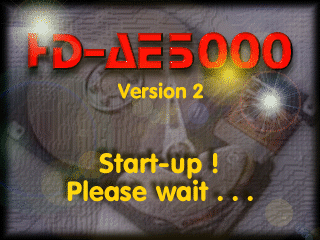
320×240, 8-bit indexed — ROM offset 0x661CE (CPU 0x2E61CE), rendered with its own palette at 0x2E5DCE
This image had never been identified before commit abdf0ea. It reads “HD-AE5000 / Version 2 / Start-up ! / Please wait . . .” in red and white over a photograph of an opened hard disk, and it is the first thing an HD-AE5000-equipped KN5000 puts on screen.
It had been hiding in plain sight: the old HDAE5000_Palette_Data slice claimed to be “VGA palette data (256 entries)” but ran for 0x13000 bytes — 0x400 of palette followed by an entire unlabelled bitmap. Four independent facts pin it down:
- its resource descriptor at
0x28F543answers0x2E61CE/ 320 / 240; HDAE5000_Boot_Initcopies exactly 2 × 0x9600 = 76,800 bytes of it into VRAM;- 320 × 240 × 1 byte = 76,800 exactly, and
0x2E61CE + 0x12C00 = 0x2F8DCE=HDAE5000_Display_Params, so the bitmap tiles the gap with nothing left over; - rendered with the palette immediately above it, it is legible text.
The extracted asset is hdae5000/images/HDAE5000_SplashScreen.bin in the disassembly repo, byte-identical to ROM 0x2E61CE.
A sixth pair, not yet in the disassembly labels
The layout rule holds one more time than the disassembly currently records. HDAE5000_BitmapButt01 (0x28B527) — registered under the firmware’s own name BitmapButt01, object 65 of the registry — answers A1 = 0x2E3464, A2 = 42, A3 = 15. 42 × 15 = 630 bytes, and the 1,024 bytes immediately before it (0x2E3064) are a well-formed RGBX palette with byte 3 = 0x00 throughout. Rendered, the bitmap is a raised button reading STORE.
This is a documentation-side observation verified directly against original_ROMs/hd-ae5000_v2_06i.ic4; the disassembly’s data-side labels have not yet been updated for it, so three labels currently sit inside the picture:
| Label | Span | Reality |
|---|---|---|
HDAE5000_Char_Tables |
0x2E2E76 (1,561B) | Real format strings for its first 494 bytes; the rest is palette 5 plus the bitmap’s first row |
HDAE5000_Path_Strings |
0x2E348F (462B) | Entirely inside the bitmap — rows 1 to 11 |
HDAE5000_UI_Icons |
0x2E365D (167B) | First 125 bytes are the bitmap’s last three rows; the real strings start at 0x2E36DA |
Re-splitting these three at 0x2E3064 / 0x2E3464 / 0x2E36DA is queued as a follow-up.
Palette handling at run time
The HDAE5000 uses memory-mapped VGA DAC registers for palette control. VGA I/O ports are mapped to CPU address 0x170000 + port_number:
| VGA Port | CPU Address | Function |
|---|---|---|
| 0x3C8 | 0x1703C8 | Palette index register (write) |
| 0x3C9 | 0x1703C9 | Palette data (R, G, B sequentially) |
Palette Loading Sequence:
HDAE5000_Load_Paletteat0x28F8E0loops through indices 255 to 0- For each index, calculates offset = index × 4 into palette data
- Calls
HDAE5000_Palette_Setupat0x28F813with index and RGBX pointer Palette_Setupwrites index to 0x3C8, then R/G/B values to 0x3C9- Each 8-bit ROM channel is narrowed with
srl a, 4; if bit 3 of the source byte is set and the byte is below 0xF0, the result is incremented (round-to-nearest without overflowing the top value)
Only the boot-splash palette goes to the DAC at start-up. The other palettes travel with their bitmaps into OFFSCREEN_BUFFER_4 and are installed by the main CPU when the corresponding screen is drawn.
See the Image Gallery for the images themselves.
ROM Layout (rewritten)
The table below tiles the entire 512KB ROM with no gaps and no overlaps — the 54 rows sum to exactly 524,288 bytes.
| Address | Size | Contents |
|---|---|---|
| 0x280000-0x28001F | 32 | Header: “XAPR4” magic, entry vectors (JP 0x28F576, JP 0x28F662) |
| 0x280020-0x28030D | 750 | Handler_Registration — registers 11 callbacks (DISASSEMBLED) |
| 0x28030E-0x2803C1 | 180 | Four bitmap resource descriptors, 45 bytes each (DISASSEMBLED) |
| 0x2803C2-0x28F542 | 61,825 | Code section 1: Register_Frame, HD interface, filesystem, UI |
| 0x28F543-0x28F56F | 45 | Alloc_Memory — boot-splash resource descriptor (DISASSEMBLED) |
| 0x28F570-0x28F575 | 6 | Get_Init_Flag (DISASSEMBLED) |
| 0x28F576-0x28F661 | 236 | Boot_Init (DISASSEMBLED) |
| 0x28F662-0x28F6DF | 126 | Frame_Handler (DISASSEMBLED) |
| 0x28F6E0-0x28F780 | 161 | Frame_Handler_Status (DISASSEMBLED) |
| 0x28F781-0x28F784 | 4 | Frame_Handler_Exit — JP to PPORT (DISASSEMBLED) |
| 0x28F785-0x28F7DC | 88 | Clear_Work_Buffer (DISASSEMBLED) |
| 0x28F7DD-0x28F7ED | 17 | Delay_Loop (DISASSEMBLED) |
| 0x28F7EE-0x28F812 | 37 | VGA_Port_Write (DISASSEMBLED) |
| 0x28F813-0x28F8DF | 205 | Palette_Setup (DISASSEMBLED) |
| 0x28F8E0-0x28F90A | 43 | Load_Palette (DISASSEMBLED) |
| 0x28F90B | 1 | Finalize_Init — just RET |
| 0x28F90C-0x2953E1 | 23,254 | Display_Init and the rest of the 0x28F code |
| 0x2953E2-0x295411 | 48 | PPORT command jump table (12 entries) |
| 0x295412-0x295641 | 560 | PPORT menu strings (21 ASCII literals) |
| 0x295642-0x2971A2 | 7,009 | PPORT handlers |
| 0x2971A3-0x29AE9E | 15,612 | Check_HD_Present and HD routines |
| 0x29AE9F-0x29AF2C | 142 | MemCopy, MemFill, StrCopy (DISASSEMBLED) |
| 0x29AF2D-0x29BAFB | 3,023 | Buffer validate, memcompare, multiply, divide |
| 0x29BAFC-0x29BFDF | 1,252 | Registered-object name pool (69 names) |
| 0x29BFE0-0x29C0A9 | 202 | UI_Config — class parameter-name strings |
| 0x29C0AA-0x29D97D | 6,356 | RECORD_TABLE (13 × 24 B) + the 13 class-name strings — still disassembled as ~6,150 lines of instruction mnemonics (see UI Class Procedures) |
| 0x29D97E-0x29DC11 | 660 | EV_* / MT_* / *Proc name pool (44 names) |
| 0x29DC12-0x2A5D2B | 33,050 | UI descriptor pool — 769 descriptors, still decoded as instructions |
| 0x2A5D2C-0x2A6983 | 3,160 | UiObject_PtrTable — 790 × .long |
| 0x2A6984-0x2A75DB | 3,160 | UiObjectName_PtrTable — 790 × .long |
| 0x2A75DC-0x2A8499 | 3,774 | UiObjectName_Pool — 178 names + padding |
| 0x2A849A-0x2A858D | 244 | 15 screen / switch-catch name strings (label GFX_INIT_PARAMS, a misnomer) |
| 0x2A858E-0x2A898D | 1,024 | Palette 1 (TitleLogo) |
| 0x2A898E-0x2BB58D | 76,800 | Bitmap 1 — TitleLogo, 320×240 8bpp |
| 0x2BB58E-0x2BB98D | 1,024 | Palette 2 (DriveMech) — byte-identical to palette 1 |
| 0x2BB98E-0x2CE58D | 76,800 | Bitmap 2 — DriveMech, 320×240 8bpp |
| 0x2CE58E-0x2CE98D | 1,024 | Palette 3 (FilePanel) |
| 0x2CE98E-0x2E158D | 76,800 | Bitmap 3 — FilePanel, 320×240 8bpp |
| 0x2E158E-0x2E198D | 1,024 | Palette 4 (HddIcon) — Windows halftone |
| 0x2E198E-0x2E1C81 | 756 | Bitmap 4 — HddIcon, 27×27 8bpp with 28-byte stride |
| 0x2E1C82-0x2E21D7 | 1,366 | Config_Strings |
| 0x2E21D8-0x2E24FF | 808 | Test_Strings |
| 0x2E2500-0x2E2E75 | 2,422 | Dir_Strings |
| 0x2E2E76-0x2E3063 | 494 | printf-style format strings (label Char_Tables) |
| 0x2E3064-0x2E3463 | 1,024 | Palette 5 — greyscale ramp (not yet labelled in the source) |
| 0x2E3464-0x2E36D9 | 630 | Bitmap 5 — STORE button, 42×15 8bpp (not yet labelled in the source) |
| 0x2E36DA-0x2E3703 | 42 | “AcLanguage1”, “LANENG00”, “LANDEU00”, “LANFRA00” |
| 0x2E3704-0x2E5B7F | 9,340 | Multilingual_Messages (EN/DE/FR) |
| 0x2E5B80-0x2E5DCD | 590 | Lang_Codes |
| 0x2E5DCE-0x2E61CD | 1,024 | Palette 6 (HDAE5000_Palette_Data) — the boot-splash palette |
| 0x2E61CE-0x2F8DCD | 76,800 | Bitmap 6 — boot splash, 320×240 8bpp |
| 0x2F8DCE-0x2F94B1 | 1,764 | Display_Params — file extensions, format strings |
| 0x2F94B2-0x2FA133 | 3,202 | Initialised .data image, copied to RAM 0x23952A |
| 0x2FA134-0x2FFFFF | 24,268 | ROM tail: the 16-bit value 0x000E, then 24,266 bytes of 0x00 |
The last non-zero byte in the ROM is at file offset 0x7A134 (CPU 0x2FA134). Earlier versions of this page split the final region as “3,266B config + 24,204B padding”; the real split is 3,202 + 24,268, and the .data image’s length is not a guess — HDAE5000_Clear_Work_Buffer copies exactly 0x0C82 bytes.
Initialised .data image at 0x2F94B2
HDAE5000_Clear_Work_Buffer (0x28F785) copies this 3,202-byte block verbatim to RAM 0x23952A during boot. It is the firmware’s .data section: nine pointer tables holding 96 code pointers and 166 string pointers, plus the initial values of the window/dialog state records.
Every table boundary is confirmed by the entry counts that HDAE5000_Handler_Registration passes to the main CPU — the registration counts 0x45 (69), 0x0D (13) and 0x0E (14) are exactly the entry counts of these tables:
| ROM | RAM | Entries | Registered as | Contents |
|---|---|---|---|---|
| 0x2F94B2 | 0x23952A | 69 | ID 0x012A | Object handler entry points |
| 0x2F95CA | 0x239642 | 69 | ID 0x042A | Object names (parallel array) |
| 0x2F96E2 | 0x23975A | 13 lists | via RECORD_TABLE+0x14 |
Per-class parameter names |
| 0x2F9772 | 0x2397EA | 13 | ID 0x01CA | EV_* event names |
| 0x2F97AC | 0x239824 | 18 | ID 0x01EA | MT_* message names |
| 0x2F97FA | 0x239872 | 13 | ID 0x010A | UI class procedures |
| 0x2F9832 | 0x2398AA | 13 | ID 0x040A | UI class names (parallel array) |
| 0x2F986A | 0x2398E2 | — | — | Window/dialog run-time state initial values |
| 0x2F9F5A | 0x239FD2 | 14 | ID 0x014A | Screen procedures |
| 0x2F9F96 | 0x23A00E | 14 | ID 0x044A | Screen names (parallel array) |
The block must be copied rather than read in place: several of its pointers are already resolved to RAM addresses inside the copy (0x2399 9A, 0x239B84, 0x239B86, 0x239B88), which only make sense once the image is at 0x23952A.
Full listings — the 69 registered objects, the 14 screens, the 13 classes and their parameter names — are on the HDAE5000 Resources & Object Registry page.
PPORT Command Handler Jump Table
Located at 0x2953E2, this table contains 12 four-byte pointers to command handler routines:
| Index | Address | Handler | Description |
|---|---|---|---|
| 0 | 0x2958D6 | Cmd01_SendInfo | Send HD info to PC |
| 1 | 0x295914 | Cmd02_Exit | Exit PPORT mode |
| 2 | 0x2959F6 | Cmd03_ReadFSB | Read FSB from HD |
| 3 | 0x295D3C | Cmd04_SendFSB | Send FSB to PC |
| 4 | 0x29605A | Cmd05_RcvFSB | Receive FSB from PC |
| 5 | 0x296294 | Cmd06_WriteFSB | Write FSB to HD |
| 6 | 0x29632A | Cmd07_LoadHD | Load HD to Memory |
| 7 | 0x29633C | Cmd08_SendData | Send data to PC |
| 8 | 0x2964A6 | Cmd09_SendFiles | Send files to PC |
| 9 | 0x296588 | Cmd10_RcvData | Receive data from PC |
| 10 | 0x29659A | Cmd11_SaveMem | Save memory to HD |
| 11 | 0x296680 | Cmd12_Nothing | (reserved) |
Key Routine Addresses
Code Section 1 (0x280020-0x28F575)
| Address | Name | Description |
|---|---|---|
| 0x280020 | HDAE5000_Handler_Registration |
Registers 11 callbacks via RegisterObjectTable + final dispatch (DISASSEMBLED) |
| 0x28030E | HDAE5000_Alloc_Memory_1 |
Bitmap resource descriptor → 0x2A898E, 320×240 |
| 0x28033B | HDAE5000_Alloc_Memory_2 |
Bitmap resource descriptor → 0x2BB98E, 320×240 |
| 0x280368 | HDAE5000_Alloc_Memory_3 |
Bitmap resource descriptor → 0x2CE98E, 320×240 |
| 0x280395 | HDAE5000_Alloc_Memory_4 |
Bitmap resource descriptor → 0x2E198E, 27×27. Firmware name: BitmapHdd_icon |
| 0x2803C2 | HDAE5000_Register_Frame |
Frame-handler registration + the bitmap/palette copy code (9,266 bytes, DISASSEMBLED) |
| 0x28B527 | HDAE5000_BitmapButt01 |
Bitmap resource descriptor → 0x2E3464, 42×15 (STORE button) |
| 0x28F543 | HDAE5000_Alloc_Memory |
Bitmap resource descriptor → 0x2E61CE, 320×240 (boot splash) |
| 0x28F570 | HDAE5000_Get_Init_Flag |
Return HD presence flag from 0x230EDA |
Code Section 2 (0x28F662-0x2FFFFF)
| Address | Name | Description |
|---|---|---|
| 0x28F662 | HDAE5000_Frame_Handler |
Main entry - calculates display offset, calls callbacks |
| 0x28F6E0 | HDAE5000_Frame_Handler_Status |
Status check - monitors handler bit 2 changes |
| 0x28F781 | HDAE5000_Frame_Handler_Exit |
Exit via JP to PPORT_Handler at 0x29501C |
| 0x28F785 | HDAE5000_Clear_Work_Buffer |
Clear 0xF52A bytes at 0x22A000, copy the 0xC82-byte .data image |
| 0x28F7DD | HDAE5000_Delay_Loop |
Nested delay loop - decrements XWA until zero |
| 0x28F7EE | HDAE5000_VGA_Port_Write |
Write byte C to VGA port WA (mapped at 0x170000+port) |
| 0x28F813 | HDAE5000_Palette_Setup |
Set one VGA palette entry (index in A, RGB in XBC) |
| 0x28F8E0 | HDAE5000_Load_Palette |
Load all 256 palette entries from ROM data |
| 0x28F90B | HDAE5000_Finalize_Init |
Just returns - 1-byte stub |
| 0x28F90C | HDAE5000_Display_Init |
Display/callback initialization via workspace |
| 0x29501C | HDAE5000_PPORT_Handler |
PPORT state machine entry |
| 0x2950F8 | HDAE5000_Display_String |
Display string routine (heavily used) |
| 0x2952D6 | HDAE5000_PPORT_Menu |
PPORT menu handler |
| 0x2971A3 | HDAE5000_Check_HD_Present |
RAM test + HD initialization (32KB test fill) |
| 0x2999B0 | HDAE5000_Version_Info |
Version string block |
| 0x29AE9F | HDAE5000_MemCopy |
Memory copy utility (optimized word/dword operations) |
| 0x29AEC7 | HDAE5000_MemFill |
Memory fill (aligns to 4-byte, uses 32-bit writes) |
| 0x29AF0B | HDAE5000_StrCopy |
String copy (finds length, copies with null) |
| 0x29B72D | HDAE5000_Multiply |
32-bit multiply routine |
| 0x29BAFC | HDAE5000_Str_* pool |
The 69 registered-object name strings |
| 0x29BFE0 | HDAE5000_UI_Config |
Class parameter-name strings |
| 0x29C0AA | HDAE5000_RECORD_TABLE |
13 UI class records, 24 bytes each |
| 0x29D97E | HDAE5000_RECORD_COUNT |
Record-count word (0x000D) + name pool: 44 EV_* / MT_* / *Proc strings |
| 0x29DC12 | (UI descriptor pool) | 769 UI object descriptors — still decoded as instructions |
| 0x2A5D2C | HDAE5000_UiObject_PtrTable |
790-entry pointer array (was GFX_DATA_1) |
| 0x2A6984 | HDAE5000_UiObjectName_PtrTable |
790-entry pointer array (was GFX_DATA_2) |
| 0x2A75DC | HDAE5000_UiObjectName_Pool |
The 178 UI object names |
| 0x2A849A | HDAE5000_GFX_INIT_PARAMS |
Misnomer — 15 screen/switch-catch name strings |
| 0x2A858E | HDAE5000_Palette_TitleLogo |
256 RGBX entries |
| 0x2A898E | HDAE5000_Bitmap_TitleLogo |
320×240 8bpp |
| 0x2BB58E | HDAE5000_Palette_DriveMech |
256 RGBX entries (= TitleLogo palette) |
| 0x2BB98E | HDAE5000_Bitmap_DriveMech |
320×240 8bpp |
| 0x2CE58E | HDAE5000_Palette_FilePanel |
256 RGBX entries |
| 0x2CE98E | HDAE5000_Bitmap_FilePanel |
320×240 8bpp |
| 0x2E158E | HDAE5000_Palette_HddIcon |
Windows halftone palette |
| 0x2E198E | HDAE5000_Bitmap_HddIcon |
27×27 8bpp, 28-byte stride |
| 0x2E1C82 | HDAE5000_Config_Strings |
Version “V2.06i”, status table, config codes |
| 0x2E5DCE | HDAE5000_Palette_Data |
Boot-splash palette |
| 0x2E61CE | HDAE5000_Bitmap_BootSplash |
320×240 8bpp boot splash |
| 0x2F8DCE | HDAE5000_Display_Params |
File extensions (.SEQ through .TTX) |
| 0x2F94B2 | HDAE5000_Init_Data |
Initialised .data image, copied to 0x23952A |
Retired labels: HDAE5000_Font_Data (0x2BA1A6 — no font exists there, and the address falls inside bitmap 1), HDAE5000_GFX_DATA_1 / HDAE5000_GFX_DATA_2 (0x2A5D2C / 0x2A6984 — pointer tables, not graphics).
Frame Handler Flow
The frame handler at 0x28F662 performs these steps:
- Check workspace pointer at
0x23A19E(skip if -1) - Read handler states from
0x230ED2,0x230ED6 - Calculate display offset, store at
0x230EC6 - Call registered callbacks via workspace function pointers
- Check handler 1 status bit 2 at
0x230ECC - If status changed, call status routines at
0x28B3B3 - Exit via JP to PPORT handler at
0x29501C
Handler Registration (0x280020) – FULLY DISASSEMBLED
The HDAE5000_Handler_Registration routine registers 11 callback handlers with the main CPU’s workspace dispatch system via RegisterObjectTable (0xFA42FB), plus a final special call via dispatch offset 0x0270 for graphics initialization. Each handler registration copies a 14-byte parameter block to object_table[handler_id * 14] at the workspace base (0x027ED2).
For handler 0x016A (port 0x01600004), the handler function is read from workspace[0x0E0A][0x0168], which resolves to ClassProc (0xFA44E2) — the shared handler used by all DISK MENU modules. The actual firmware symbols for the dispatch system are: SendEvent (0xFA9660), ClassProc (0xFA44E2), ObjectProc (0xFA3D85), InheritedProc (0xFA4409), PostEvent (0xFAD61F).
Registration Structure (14 bytes on stack):
| Offset | Size | Field | Description |
|---|---|---|---|
| 0x00 | 4 | Port Address | PPI port identifier (e.g. 0x01600004) |
| 0x04 | 4 | Handler Func | Handler function pointer from workspace table |
| 0x08 | 2 | Count | Number of entries in the data table |
| 0x0A | 4 | Data Pointer | Pointer to RAM or ROM data area |
Registered Handlers (corrected):
| ID | Port | Table Offset | Count | Data Pointer | Purpose |
|---|---|---|---|---|---|
| 0x016A | 0x01600004 | 0x0168 | 13, read from ROM 0x29D97E | 0x29C0AA | 13 UI class records |
| 0x01CA | 0x0160000C | 0x013C | 13, read from RAM 0x239822 | 0x2397EA | EV_* event names (RAM copy) |
| 0x01EA | 0x0160000D | 0x0140 | 18, read from RAM 0x239870 | 0x239824 | MT_* message names (RAM copy) |
| 0x012A | 0x01600002 | 0x0248 | 0x45 | 0x23952A | 69 object handler entry points |
| 0x042A | 0x01600002 | 0x0248 | 0x45 | 0x239642 | 69 object names |
| 0x010A | 0x01600001 | 0x0244 | 0x0D | 0x239872 | 13 UI class procedures |
| 0x040A | 0x01600001 | 0x0244 | 0x0D | 0x2398AA | 13 UI class names |
| 0x014A | 0x01600003 | 0x024C | 0x0E | 0x239FD2 | 14 screen procedures |
| 0x044A | 0x01600003 | 0x024C | 0x0E | 0x23A00E | 14 screen names |
| 0x007F | 0x01600010 | 0x0280 | 0x315 | 0x2A5D2C | UI object descriptor table |
| 0x037F | 0x0160000F | 0x0148 | 0x315 | 0x2A6984 | UI object name table |
The 0x315 field on the last two rows was previously annotated “size = 789 bytes”. It is an entry count: 0x315 = 789 objects, and both tables hold 790 .long entries — 789 plus a terminator. Commit db26eca corrected the annotation in six places.
Handler 0x016A Data Record Table (at 0x29C0AA): a table of 13 named sub-objects, 24 bytes each, representing the HDAE5000’s UI components. See UI Class Procedures above for the full list with parameter counts. Each record links to a corresponding Root module (0x0160) component via a “next” pointer, forming an inheritance chain. Record 5 (HDTitleMenu) is the DISK MENU entry, matching the slot+0x00 = 0x016A0005 identifier.
RAM Test and HD Initialization (0x2971A3)
The HDAE5000_Check_HD_Present routine performs hardware validation:
- RAM Test Pattern Fill - Fills 32KB (0x230F1C-0x238F1C) with 0x5A5A
- Verify Pattern - Reads back and compares each word
- Clear RAM - Fills same range with 0x0000
- Initialize Variables - Sets up HD-related variables at 0x229Dxx:
0x229D90: Status flag0x229D92: Result flag (returned in L)0x229D99-0x229DAE: Configuration flags0x229DC8: Control flag0x229DD9: Enable flag
Returns: L = 0 if no HD present, non-zero if HD detected.
Memory Utility Routines (0x29AE9F)
Optimized memory manipulation functions:
| Address | Function | Description |
|---|---|---|
| 0x29AE9F | MemCopy | Stack params: dest, src, count (16-bit). Uses LDIRW for words. |
| 0x29AEC7 | MemFill | Aligns to 4-byte boundary, then uses 32-bit writes |
| 0x29AF0B | StrCopy | Finds string length, copies including null terminator |
MemCopy’s 16-bit length is why every full-screen bitmap in this ROM is moved as two halves.
Version Info Block (0x2999B0)
309 bytes of .ascii (0x2999B2-0x299AE6), containing identification strings:
- “Technics Software section M. Kitajima”
- Version “2.33J”, also “2.21”
- “TECHNICS KN5000”
These bytes also happen to form a chain of valid TLCS-900 encodings with no
external references — a self-contained illusion of code that reassembles
byte-exact either way, which is why the source now spells this span as
.ascii rather than trusting a byte-identical disassembly.
Developer Credits (0x2A477C)
The label HDAE5000_Credits sits inside the UI descriptor pool and picks out two company identification strings:
- “Technosoft, CH-Samstagern” — Swiss software company (Samstagern, Canton of Zurich)
- “Pointstyle, CH-Buttisholz” — Swiss company (Buttisholz, Canton of Lucerne)
Caution: 0x2A477C is not a structure boundary. It falls in the middle of the 769-descriptor pool at 0x29DC12-0x2A5D2B, as do the neighbouring labels HDAE5000_UI_Descriptors, HDAE5000_UI_Page_Titles, HDAE5000_Panel_Save_UI and HDAE5000_Demo_Data — none of the five coincides with a descriptor start. They are convenience markers for interesting strings, not section boundaries, and re-carving the pool is the next queued package.
Firmware Versions
Multiple firmware versions exist for the HDAE5000:
| Version | Release Date | Notes |
|---|---|---|
| v1.10i | 1998-07-06 | Initial release |
| v1.15i | 1998-10-13 | Bug fixes |
| v2.0i | 1999-01-15 | Added lyrics display feature |
| v2.06i | Unknown | Analyzed version (2.33J internal) |
All versions are archived at archive.org. Only v2.06i has a disassembly.
Hardware Features
Based on marketing documentation and firmware analysis:
- Storage: 2.5” Hard Disk Drive (1.08 GB capacity)
- Flash-ROM/SRAM: Quick directory access cache
- Parallel Port: DB-25 connector for PC communication
- Audio Outputs: Channel separation options
Limitations
Files cannot be played directly from the hard drive during performance. All file operations occur during breaks to protect the drive mechanism. This is a design decision to prevent disk wear during live performance.
HD-TechManager5000 PC Software
The HD-TechManager5000 is a Windows 95 application developed by Pointstyle (CH-Buttisholz, Switzerland) for Key Soft Service (CH-Schenkon). It communicates with the KN5000 via a CE-approved parallel port cable connected to the DB-25 port on the rear of the keyboard.
- Copyright: © 1994-97 Pointstyle
- Programmers: R. Wapf and E. Kruppenbacher
- Protocol design: A. Fässler (Technosoft, CH-Samstagern)
- Requirements: Windows 95, 486+ CPU, 16MB RAM, LPT parallel port (does NOT run on Windows NT)
- Main executable: HD-TE96.exe (with ppkn50.dll for parallel port protocol)
- Additional DLL: ConvKN.dll (file conversion library)
Software Functions
The software has 4 main sections:
| Section | Function |
|---|---|
| CHECK PORT | Tests parallel port communication (LPT1 default, 2-3 second handshake) |
| BACKUP | Full or incremental backup of HD-AE5000 to PC. Three modes: Main (full mirror), Archive (incremental — only files with archive flag), Selected (resume from interruption point) |
| RESTORE | Writes backup data from PC back to HD-AE5000. ~40% slower than backup. Optional 2-digit password protection per file |
| TOOLS | File management operations on the HD-AE5000 |
TOOLS Sub-Functions
| Tool | Description |
|---|---|
| COPY TO HD-AE | Copy KN5000 files from any PC drive to HD. Validates file integrity (rejects manipulated KN3000 files) |
| RENAME | Rename songs (up to 26 characters) and directories. “Text einfügen”/”Text kopieren” for batch renaming |
| MOVE | Logical-only directory reorganization (relinks entries, doesn’t move physical data). Updates F.L.S. references automatically |
| Print directory listings. Options: column/directory/alphabetical/F.L.S. layout, small/medium/large font, draft/high quality. Can also export to text file | |
| EDIT-FLS | Create and edit F.L.S. (File Load Scripts) — up to 32 file links per script with A.L. (Auto Load after sequencer stop) and A.S. (Auto Stop after load) for live performance |
| DELETE | Delete files and directories from HD |
| FORMAT | Format the HD-AE5000 hard disk |
Keyboard Preparation (Slave Mode)
To use the software, the keyboard must be set to slave mode:
- Press MEMORY & CONTROL → (HD-AE5000) HARDDISK → SETUP & TOOLS → PC DATA LINK → START
- The keyboard becomes unresponsive during transfer — power cycle to exit slave mode
Update File Format
HDAE5000 firmware updates use file type ID 6:
Header: "Technics KN5000 HD-AEPRG DATA FILE    " (38 bytes)
Target: 0x280000 (512KB)
The update is loaded via the standard KN5000 firmware update mechanism when the appropriate disk is inserted.
Disassembly Status
| Component | Status | Notes |
|---|---|---|
| ROM rebuild | Byte-identical | scripts/build/compare_roms.py reports a byte-for-byte match against original_ROMs/hd-ae5000_v2_06i.ic4. This proves the source reassembles to the same bytes — it says nothing about whether the labels are right, which is why the corrections on this page were possible without the rebuild ever breaking |
| Entry point vectors | 100% | JP instructions at 0x280008, 0x280010 |
| Boot initialization | Disassembled | 236 bytes at 0x28F576, splash blit now identified |
| Handler_Registration | Disassembled | 750 bytes - registers 11 callbacks via RegisterObjectTable |
| Bitmap resource descriptors | Disassembled | 6 routines: 5 × 45 bytes + BitmapButt01 |
| Register_Frame | Disassembled | 9,266 bytes including the bitmap/palette copy code |
| Frame handler group | Disassembled | 126 + 161 + 4 bytes |
| Palette/VGA group | Disassembled | Load_Palette, Palette_Setup, VGA_Port_Write, Delay_Loop |
| PPORT jump table + strings | Disassembled | 12 labeled dd entries, 21 ASCII literals |
| Registered-object names | Data | 1,252 B at 0x29BAFC, was decoded as instructions |
.data image at 0x2F94B2 |
Data | 3,202 B: nine tables, 96 code + 166 string pointers, all 96 code targets named |
| UI object + name tables | Data | 10,094 B at 0x2A5D2C, was decoded as instructions |
| Graphics bank | Labelled slices | 6 palette/bitmap pairs. Five are extracted as image assets (the icon’s asset over-reads by 28 bytes); the STORE button and its palette are identified here but not yet split in the source |
| UI descriptor pool | NOT DONE | 33,050 B at 0x29DC12 — 769 descriptors still decoded as instructions under five non-boundary labels. The next queued package |
| Filesystem | In progress | Documented — FSB/FGB/FEB hierarchy, most routines disassembled |
Measured from the current sources (7 .s files, 75,180 lines, 534 symbol-reference rows):
- Everything still held as
.incbinin the LLVM/GAS tree is pixel and palette data: 10 slices totalling 313,076 bytes. There are no remaining raw code blobs in that tree. (The ASL mirror underarchive/asl/stillbincludes the five originalcode_*.binblobs; it is a parallel build, not the primary source.) - A labelled binary slice is not documentation. The 313,076 bytes are honest picture data with the right boundaries and names — nothing more is claimed for them.
- The largest genuinely undone item is the 33,050-byte UI descriptor pool.
MAME Emulation Status
| Component | Status | Notes |
|---|---|---|
| Extension board detection | Working | ROM loads at 0x280000, board detected by firmware |
| Extension DRAM | Working | 512KB RAM at 0x200000-0x27FFFF (2×256KB SRAM, IC5+IC6) |
| IDE/ATA interface | Wired | ata_interface_device connected at CS0 (0x130010-0x13001F), CS1 (0x130020-0x130021) |
| Hard disk image | Loadable | Standard IDE HDD image via -hard flag |
| PPI (parallel port) | Stubbed | i8255 device instantiated but callbacks not connected |
| IRQ routing | Working | ATA INTRQ (CN6 pin 58) → ata_intrq_w → extension-slot IRQ → TLCS900_INT9 |
| Homebrew ROM loading | Working | Custom ROMs loadable via -extension hdae5000 |
The MAME driver file is src/devices/bus/technics/kn5000/hdae5000.cpp.
The boot splash is a useful emulation smoke test: if the driver reaches HDAE5000_Boot_Init and the VRAM path works, the “Start-up ! / Please wait . . .” screen appears before any disk access happens.
Creating Test Disk Images for MAME
This section explains how to create a virtual hard disk image for testing the HDAE5000 hard disk expansion in MAME.
Prerequisites
You need chdman, the MAME Compressed Hunks of Data manager tool. It is built alongside MAME and should be available at the root of your MAME build directory (e.g. mame/chdman). Verify it is present:
./chdman help createhd
Disk Geometry
The real HD-AE5000 used a 2.5” laptop IDE hard disk with approximately 1.08GB capacity. The firmware reads the drive’s CHS (Cylinder/Head/Sector) geometry via the ATA IDENTIFY DEVICE command (0xEC) and uses CHS addressing for all disk operations.
A reasonable geometry for a ~1GB drive is:
| Parameter | Value |
|---|---|
| Cylinders | 2100 |
| Heads | 16 |
| Sectors per track | 63 |
| Bytes per sector | 512 |
| Total capacity | 1,083,801,600 bytes (~1.03GB) |
These values are representative of typical 2.5” IDE drives from the mid-1990s. The firmware accepts whatever geometry the drive reports, so the exact values are not critical.
Creating a Blank CHD Image
Use chdman createhd to create a blank hard disk image in MAME’s CHD (Compressed Hunks of Data) format:
chdman createhd --output hdae5000.chd --chs 2100,16,63 --sectorsize 512
This creates a compressed CHD file. Since the disk is blank (all zeros), the CHD will be very small (around 1MB) despite representing a ~1GB drive. The file grows as data is written to it.
To create an uncompressed CHD (slightly faster for testing, but uses more disk space):
chdman createhd --output hdae5000.chd --chs 2100,16,63 --sectorsize 512 --compression none
Creating a Raw Disk Image (Alternative)
MAME also accepts raw disk images with .hd or .hdi extensions. A raw image is simply a file containing the raw sector data:
# Create a 1GB sparse file (instant, uses no actual disk space until written)
truncate -s 1083801600 hdae5000.hd
Note: Raw images do not carry CHS metadata. MAME will infer geometry from the file size, which may not exactly match what the firmware expects. CHD images are recommended because they embed the CHS parameters explicitly.
Loading the Disk Image in MAME
Use the -hard option to attach the disk image when launching MAME with the HDAE5000 extension:
mame kn5000 -extension hdae5000 -hard hdae5000.chd
The -extension hdae5000 flag loads the HDAE5000 extension board ROM, and -hard attaches the disk image to the IDE interface.
For automated/headless testing, add the standard skip flags:
mame kn5000 -extension hdae5000 -hard hdae5000.chd \
  -skip_gameinfo -seconds_to_run 120 -nothrottle -window
Expected Behavior
When booting with a blank/unformatted disk, the firmware should:
- Detect the HD-AE5000 board via the PE port bit 0 presence line
- Show the boot splash (“HD-AE5000 / Version 2 / Start-up ! / Please wait . . .”)
- Issue IDENTIFY DEVICE (0xEC) to read the drive’s CHS geometry
- Attempt to read the FSB (File System Block) from the disk
- Report an error because the disk has no valid filesystem – expect messages like “Hard disk FSB read error” or “Hard disk FAT read error” (the firmware uses “FAT” loosely in error messages despite using a custom filesystem)
To format the disk, you would normally use:
- On the keyboard: MEMORY & CONTROL -> (HD-AE5000) HARDDISK -> SETUP & TOOLS -> select format option
- From a PC: The HD-TechManager5000 software’s TOOLS -> FORMAT function via the parallel port interface (not yet emulated in MAME)
Pre-Formatting Disk Images
The HDAE5000 uses a custom proprietary filesystem with a three-level hierarchy of FSB (File System Block), FGB (File Group Block), and FEB (File Entry Block) structures. This is not a standard filesystem like FAT.
No tool currently exists to pre-format disk images with the HDAE5000 filesystem structure from outside MAME. The filesystem layout is partially documented:
- FSB occupies the first few sectors (Sectors 0-4) and contains volume metadata, directory pointers, and a sector allocation table
- Sector allocation uses VarInt-encoded entries in a 20KB table (max 20,457 sectors)
- Directory entries are 37 bytes each on disk, with up to 120 total slots across 5 pages of 24 entries
- Partitions support up to 16 per disk, each with up to 40 file entries
Building a pre-formatting tool is possible given the filesystem documentation, but the simplest approach is to format the disk through the firmware itself once the MAME emulation is complete enough to support the format operation.
Verifying the Disk Image
To inspect or verify a CHD image:
# Show CHD metadata (geometry, compression, size)
chdman info --input hdae5000.chd

# Extract raw data from CHD for analysis
chdman extracthd --input hdae5000.chd --output hdae5000.raw

# Convert raw image back to CHD
chdman createhd --input hdae5000.raw --output hdae5000.chd --chs 2100,16,63 --sectorsize 512
Workspace Pointer & Object Dispatch System
The main firmware passes workspace pointer 0x027ED2 in XWA when calling Boot_Init. This is the base of the firmware’s object table in main DRAM — a 14-byte-per-entry table supporting up to 1,120 objects (handler IDs 0x0000-0x045F). The HDAE5000 stores this at 0x23A1A2 and uses it to access the firmware’s callback dispatch system via handler table offsets at +0x0E0A and +0x0E88.
The XAPR detection flag at 0x03DD04 controls whether the Frame_Handler is called. The firmware sets this to 1 when the XAPR signature is validated, and checks it on every main loop iteration before calling the frame handler at 0x280010.
Firmware Dispatch Functions
The firmware’s object-oriented dispatch system uses these key functions (names from the main CPU symbol table):
| Address | Symbol | Purpose |
|---|---|---|
| 0xFA9660 | SendEvent |
Synchronous event dispatch: looks up handler, calls identity query, then calls record function |
| 0xFA44E2 | ClassProc |
UI event handler shared by all DISK MENU modules (port 0x01600004) |
| 0xFA3D85 | ObjectProc |
Object lifecycle event handler (events 0x10-0x23) |
| 0xFA4409 | InheritedProc |
Follows “next handler” chain in data records |
| 0xFA42FB | RegisterObjectTable |
Copies 14-byte param block to object_table[id * 14] |
| 0xFA431A | RegisterObject |
Registers individual object entry |
| 0xFA43B3 | UnRegisterObject |
Removes object entry |
| 0xFAD61F | PostEvent |
Queues event for asynchronous dispatch (ring buffer at 0x02BC34) |
| 0xFA40B2 | InitializeObjectTable |
Clears all table entries and registers built-in handlers |
See HDAE5000 Homebrew Development for detailed analysis of each function.
Related Documentation
- HDAE5000 Resources & Object Registry - The 69-object registry, 789 UI objects, screens, classes,
.dataimage - HDAE5000 Homebrew Development - Writing custom extension ROMs, LLVM bugs
- Hard Disk Interface - IDE/ATA low-level protocol
- HDAE5000 Filesystem - Custom proprietary filesystem (FSB/FGB/FEB hierarchy)
- Image Gallery - The extracted bitmaps
- Memory Map - Address space layout
- Hardware Architecture - System overview
- Reverse Engineering - PPI interface details
- System Update Procedures - Update file formats
External References
- HDAE5000 Technical Info - Keysoftservice documentation
- System Update Disks Archive - All firmware versions