Image Gallery
Embedded Image Gallery
Images extracted from the KN5000 firmware ROMs. These graphics are displayed on the built-in LCD screen (320x240 pixels, controlled by IC206 MN89304).
Feature Demo Images (Table Data ROM)
These BMP images are used in the keyboard’s feature demonstration mode.
System Update Bitmaps
The Table Data ROM also contains 8 system update message bitmaps at address 0x9FA156. These are the same images as the Main CPU ROM system update bitmaps - both ROMs share identical bitmap data.
| Address | Image | Purpose |
|---|---|---|
| 0x9FA156 | Flash Memory Update | Update in progress |
| 0x9FA3BE | Now Erasing | Flash erase in progress |
| 0x9FA626 | FD to Flash Memory | Copying from floppy |
| 0x9FA88E | Completed | Operation complete |
| 0x9FAAF6 | Please Wait | Processing |
| 0x9FAD5E | Change FD 2 of 2 | Multi-disk prompt |
| 0x9FAFC6 | Illegal Disk | Invalid disk error |
| 0x9FB22E | Turn On AGAIN | Restart instruction |
Note: The Table Data ROM uses 16-bit word-level interleaving (stored across two physical ROM chips: odd.ic1 and even.ic3). When properly combined, the bitmap data is byte-identical to the Main CPU versions. The disassembly source shares the same bitmap files between both ROMs.
FTBMP01 - Technics Logo + World Globe (FTDEMO_SCREEN01_TECHNICS_GLOBE)

320x240, 8-bit color — The Technics brand logo overlaid on a world globe graphic. Used as the opening image of the Feature Demo presentation.
FTBMP02 - Subwoofers (FTDEMO_SCREEN02_SUBWOOFERS)
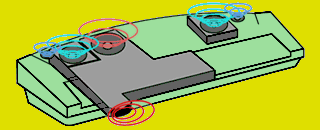
320x130, 8-bit color — A showcase image of the KN5000’s integrated subwoofer speakers.
FTBMP03 - Floppy Disks (FTDEMO_SCREEN03_FLOPPY_DISKS)
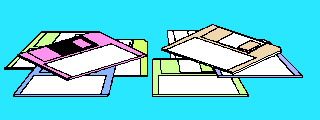
320x120, 8-bit color — A collection of floppy disks, highlighting the keyboard’s built-in floppy drive.
FTBMP04 - Disk Insertion (FTDEMO_SCREEN04_DISK_INSERT)
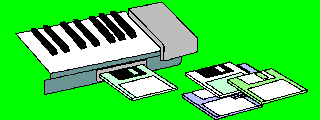
320x120, 8-bit color — A floppy disk being inserted into the KN5000’s drive slot.
FTBMP05 - 360° Surround Arrows (FTDEMO_SCREEN05_SURROUND_ARROWS)

320x125, 8-bit color — Arrows arranged in a 360° pattern, representing the keyboard’s surround sound capabilities.
FTBMP06 - KN5000 + Rainbow Comet (FTDEMO_SCREEN06_KN5000_RAINBOW)
320x240, 8-bit color — The KN5000 model name with a rainbow comet graphic. Used as the closing image of the Feature Demo presentation.
Note: All six FTBMP images reside on floppy disk (not in ROM). The “IN COLOR” text visible in the Feature Demo splash screen is pre-rendered directly into these bitmap files. Disassembly symbols: FTDEMO_SCREEN01_TECHNICS_GLOBE through FTDEMO_SCREEN06_KN5000_RAINBOW.
Main CPU ROM Images
These images were extracted from raw bitmap data in the main CPU ROM and converted to PNG.
Status Messages (1-bit bitmaps, 224x22 pixels)
| Image | Filename | Purpose |
|---|---|---|
 |
Bitmap_1bit_Flash_Memory_Update.bin |
Flash Memory Update message |
 |
Bitmap_1bit_Now_Erasing.bin |
Now Erasing message |
 |
Bitmap_1bit_FD_to_Flash_Memory.bin |
FD to Flash Memory message |
 |
Bitmap_1bit_Completed.bin |
Completed message |
 |
Bitmap_1bit_Please_Wait.bin |
Please Wait message |
 |
Bitmap_1bit_Change_FD_2_of_2.bin |
Change FD 2 of 2 message |
 |
Bitmap_1bit_Illegal_Disk.bin |
Illegal Disk error |
 |
Bitmap_1bit_Turn_On_AGAIN.bin |
Turn On AGAIN instruction |
Logos
| Image | Filename | Dimensions | Description |
|---|---|---|---|
 |
BitmapTechnicsLogo.bin |
312x45, 8-bit | Technics brand logo |
 |
BitmapKN5000Logo.bin |
200x36, 8-bit | KN5000 model logo |
Split Point Indicators (58x52 pixels, 8-bit)
These images show keyboard split point notes displayed when configuring the keyboard split.
| Image | Note |
|---|---|
 |
C |
 |
Db |
 |
D |
 |
Eb |
 |
E |
 |
F |
 |
Gb |
 |
G |
 |
Ab |
 |
A |
 |
Bb |
 |
B |
 |
No Split |
Drawbar Sliders (22x222 pixels, 8-bit)
| Image | Filename | Description |
|---|---|---|
 |
BitmapDrawbarNumberedSlider_1.bin |
Drawbar slider 1 |
 |
BitmapDrawbarNumberedSlider_2.bin |
Drawbar slider 2 |
 |
BitmapDrawbarNumberedSlider_3.bin |
Drawbar slider 3 |
MIDI Connection Diagrams (296x108 pixels, 8-bit)
| Image | Filename | Description |
|---|---|---|
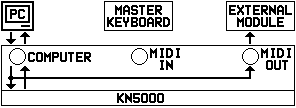 |
BitmapMIDIConnections_1.bin |
MIDI connections diagram 1 |
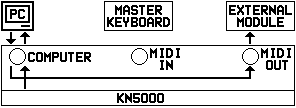 |
BitmapMIDIConnections_2.bin |
MIDI connections diagram 2 |
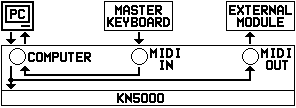 |
BitmapMIDIConnections_3.bin |
MIDI connections diagram 3 |
UI Elements
| Image | Filename | Dimensions | Description |
|---|---|---|---|
 |
BitmapWormWearingHat.bin |
24x24, 8-bit | Easter egg - worm wearing hat |
 |
BitmapSomeArrows.bin |
294x6, 8-bit | Arrow icons strip |
Transition Effects
| Image | Filename | Dimensions | Description |
|---|---|---|---|
 |
BitmapFadeInPicture.bin |
112x25, 8-bit | Fade in picture effect |
 |
BitmapFadeOutPicture.bin |
114x25, 8-bit | Fade out picture effect |
 |
BitmapFadeInText.bin |
80x18, 8-bit | Fade in text effect |
 |
BitmapFadeOutText.bin |
108x20, 8-bit | Fade out text effect |
Accompaniment & Edit Graphics
| Image | Filename | Dimensions | Description |
|---|---|---|---|
 |
BitmapAccger16.bin |
120x95, 8-bit | Accompaniment graphic (German) |
 |
BitmapAccita16.bin |
120x95, 8-bit | Accompaniment graphic (Italian) |
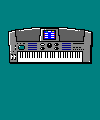 |
BitmapBmphk.bin |
100x120, 8-bit | Unknown graphic |
 |
BitmapDredt0d.bin |
168x119, 8-bit | Unknown graphic |
 |
BitmapDredt0k.bin |
88x119, 8-bit | Unknown graphic |
 |
BitmapNtedt0d.bin |
240x127, 8-bit | Note edit graphic |
 |
BitmapNtedt0k.bin |
127x16, 8-bit | Note edit graphic small |
HDAE5000 Hard Disk Expansion ROM Images
These images were extracted from the HD-AE5000 hard disk expansion ROM. The images are 8-bit indexed color, displayed on the KN5000’s LCD during HD-AE5000 operations.
Palette rule (corrected, August 2026): every bitmap in this ROM is immediately preceded, with no padding, by its own 1,024-byte RGBX palette. There are six palette/bitmap pairs. The palette at ROM offset 0x65dce that the boot code loads into the VGA DAC belongs to the boot splash, not to the other images; the earlier note that the “main images” use it was wrong.
| Bitmap | Its palette | Geometry |
|---|---|---|
| Product logo (0x2898e) | 0x2858e | 320×240 |
| Drive mechanism (0x3b98e) | 0x3b58e | 320×240 |
| File panel (0x4e98e) | 0x4e58e | 320×240 |
| Hard disk icon (0x6198e) | 0x6158e (Windows halftone) | 27×27, 28-byte stride |
| STORE button (0x63464) | 0x63064 (greyscale ramp) | 42×15 |
| Boot splash (0x661ce) | 0x65dce | 320×240 |
Render caveat.
convert_images.pycurrently hands the boot-splash palette to all HD-AE5000 images, so the four renders below other than the splash are mis-coloured — the logo and drive-mechanism photographs in particular are greyscale images being drawn through the wrong ramp. Regenerating them per-palette is a queued fix in the disassembly repo.
HD-AE5000 Boot Splash
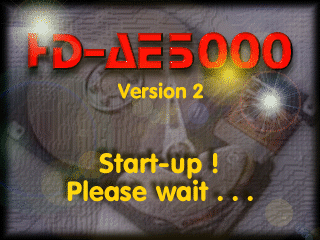
320x240, 8-bit indexed color - ROM offset: 0x661ce (CPU: 0x2E61CE)
“HD-AE5000 / Version 2 / Start-up ! / Please wait . . .” over a photograph of an opened hard disk. This is the first thing an HD-AE5000-equipped KN5000 puts on screen, and it went unidentified until August 2026 — the ROM slice that contains it was labelled “VGA palette data” and ran 0x13000 bytes, so a whole 320×240 picture was hiding behind a 1KB palette. HDAE5000_Boot_Init blits it into VRAM at 0x1A0000 as two 0x9600-byte halves. See HDAE5000.
HD-AE5000 Product Logo
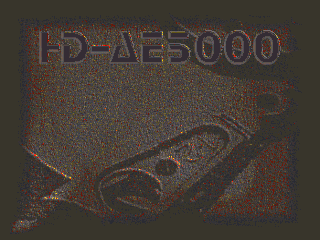
320x240, 8-bit indexed color - ROM offset: 0x2898e (CPU: 0x2A898E)
The “HD-AE5000” wordmark embossed over a photograph of a bare hard-disk mechanism. Its palette (0x2858e) is byte-identical to the next image’s — the two are the two frames of one title sequence.
Drive Mechanism (was “Hands Operating HD-AE5000”)
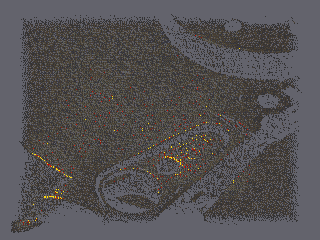
320x240, 8-bit indexed color - ROM offset: 0x3b98e (CPU: 0x2BB98E)
The same drive-mechanism photograph as the logo image, without the wordmark — the second frame of the title sequence. The old caption was wrong: there are no hands in this picture. The filename HDAE5000_Hands.bin is kept for continuity with the extraction tooling.
File Selection Panel
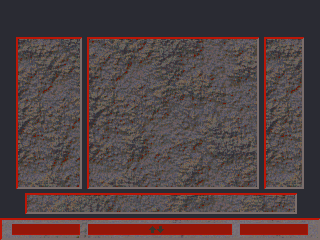
320x240, 8-bit indexed color - ROM offset: 0x4e98e (CPU: 0x2CE98E)
The file-selection panel background: three sunken list wells over a blue stone fill, with a grey scroll strip along the bottom. Its palette holds only 110 distinct colours — a long grey ramp plus the stone texture.
Hard Disk Icon

27x27 with a 28-byte row stride (756 bytes), 8-bit indexed color - ROM offset: 0x6198e (CPU: 0x2E198E)
Small icon depicting a hard disk with magnetic head, used in UI elements. Its resource descriptor (0x280395, registered under the firmware’s own name BitmapHdd_icon) answers 27 for both width and height, and the last byte of each of the 27 rows is 0x00 — a pad column.
Extraction caveat.
HDAE5000_Icon.binin the disassembly repo is 784 bytes, i.e. 28×28. The extra 28 bytes are not image data: they are the first 28 bytes ofHDAE5000_Config_Stringsat0x2E1C82, which begins with the ASCII “V2.06i”. Re-cutting the asset at 756 bytes is queued.
STORE Button
42x15, 8-bit indexed color - ROM offset: 0x63464 (CPU: 0x2E3464) — not yet extracted as an asset.
A raised button reading “STORE”, provided by HDAE5000_BitmapButt01 (0x28B527, registered as BitmapButt01) with its own greyscale-ramp palette at 0x2E3064. It sits inside the range the disassembly still labels HDAE5000_Path_Strings / HDAE5000_UI_Icons, which is why those “strings” read as runs of )BBBB…, BZZZZ… and repeated brace characters — those are pixel values (0x29, 0x42, 0x5A, 0x7B), not text.
Preset Wallpapers (Table Data ROM)
These background wallpapers are built into the firmware for the LCD display. Discovered via the SetWallPaper routine which references a wallpaper table at 0xEAAE62.
Technical details:
- Format: 320×240 pixels @ 8bpp (76,800 bytes each)
- Uses the standard KN5000 256-color palette
- The wallpaper table has 6 entries, but only entries 0-1 point to ROM data; entries 2-4 point to RAM addresses for user-loaded wallpapers
Wallpaper 0 - Blue Texture

320x240, 8-bit indexed color - Table Data ROM offset: 0x8ED000-0x8FFC00
Blue textured pattern resembling fabric or carpet.
Wallpaper 1 - Technics Branded

320x240, 8-bit indexed color - Table Data ROM offset: 0x900000-0x912C00
Blue textured pattern with subtle “Technics” watermark.
Wallpaper Routine Details
The wallpaper system uses multiple name getter routines for displaying wallpaper names in the UI:
| Routine | Address | Purpose |
|---|---|---|
WP_GetConfigName |
0xF8EDD2 | Get name from config at 0x1ED350 |
WP_GetNameByOffset |
0xF8EE00 | Get name with calculated offset |
WP_GetPresetName1 |
0xF8EE30 | Lookup from ROM table 0xEA07AE |
WP_GetPresetPtr |
0xF8EE56 | Simple pointer lookup from 0xEA07EA |
WP_GetBankMemName |
0xF8EE65 | Get name with bank/memory selection |
WP_GetPresetName3 |
0xF8EEB5 | Lookup from ROM table 0xEA08DA |
WP_GetUserName1 |
0xF8EEDB | Get from structure at 0x1E0000 |
WP_GetUserName2 |
0xF8EF08 | Get from RAM at 0x1E4980 |
WP_GetUserName3 |
0xF8EF2C | Get from 0x1E4AA7 |
UI Icons (Table Data ROM)
The KN5000 uses 176 small icons for menu items and UI elements. These were discovered by analyzing the DrawIcons routine at 0xFABF3F.
Technical details:
- Icon table at
0x938000(Table Data ROM offset0x138000) - All 176 icons are 24×24 pixels @ 4bpp (288 bytes each)
- The
DrawIconsroutine has hardcoded loops: 12 bytes/row × 24 rows - The “dims” field in the table is the UI bounding box (for hit testing), NOT pixel dimensions
- 4bpp format: 2 pixels per byte (high nibble first, low nibble second)
- 16-color CGA/EGA-style palette from main ROM at
0xEB37DE
Color Palette:
| Nibble | Palette Index | Color |
|---|---|---|
| 0 | 0x00 | Black |
| 1 | 0x01 | Dark Red |
| 2 | 0x02 | Dark Green |
| 3 | 0x03 | Olive |
| 4 | 0x04 | Dark Blue |
| 5 | 0x05 | Dark Magenta |
| 6 | 0x06 | Dark Cyan |
| 7 | 0x07 | Light Gray (background) |
| 8 | 0xF8 | Dark Gray |
| 9 | 0xF9 | Bright Red |
| 10 | 0xFA | Bright Green |
| 11 | 0xFB | Yellow |
| 12 | 0xFC | Bright Blue |
| 13 | 0xFD | Magenta |
| 14 | 0xFE | Cyan |
| 15 | 0xFF | White |
Icon Sprite Sheet
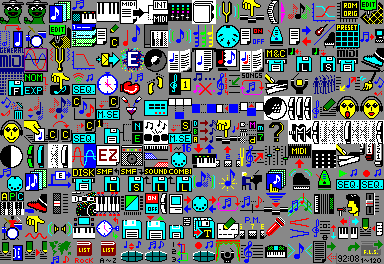
384x264 pixels - all 176 icons arranged in 16 columns × 11 rows
The sprite sheet shows all 24×24 pixel icons. Icon IDs are numbered left-to-right, top-to-bottom starting from 0. Known icons include:
- Icon 0-1: Document/file icons
- Icon 7: Appears to be related to Easter egg (worm reference in code)
Icons with Non-Standard Bounding Boxes
Three icons have larger bounding boxes for UI hit-testing purposes, but still use standard 24×24 pixel data:
| Icon | Bounding Box | Notes |
|---|---|---|
| 173 | 27×27 | Standard 24×24 pixel data |
| 174 | 27×27 | Standard 24×24 pixel data |
| 175 | 28×28 | Standard 24×24 pixel data |
Icon Table Structure
Each icon table entry is 8 bytes:
| Offset | Size | Description |
|---|---|---|
| 0 | 2 | Bounding box width (for UI hit testing, NOT pixel width) |
| 2 | 2 | Bounding box height (for UI hit testing, NOT pixel height) |
| 4 | 4 | Pointer to pixel data in ROM |
Most icons have bounding box 0x18 × 0x18 (24×24). The DrawIcons routine ignores these values for rendering - it always draws 24×24 pixels using hardcoded loops (12 bytes/row × 24 rows).
Image Format Notes
- Table Data BMP: Standard Windows BMP format, 8-bit indexed color
- Main CPU raw: Custom format, raw pixel data without headers, uses RGBA palette at
0xEB37DE - HDAE5000 raw: Raw pixel data. Each bitmap has its own 1,024-byte RGBX palette in the 1,024 bytes immediately before it (see the table above); the fourth byte of every palette entry is 0x00. Only the boot-splash palette (
0x65dce) reaches the VGA DAC at start-up — the others travel with their bitmap intoOFFSCREEN_BUFFER_4(0x69400) and are installed when that screen is drawn - 1-bit bitmaps: Monochrome, 224x22 pixels (28 bytes per row) - shared between Main CPU and Table Data ROMs
- 8-bit bitmaps: 256-color indexed, dimensions vary by image
- LCD resolution: 320x240 pixels (QVGA)
- LCD controller: MN89304 with 4Mbit Video RAM (IC207)
Cross-ROM Shared Graphics
Analysis found ~39 KB of near-identical graphics data shared between the Main CPU Program ROM and Table Data ROM. These are not exact duplicates — they match 89-96% at the byte level, with differences primarily in adjacent byte ordering (suggesting different rendering passes of the same source artwork).
| Main CPU Image | Main CPU Address | Table Data Address | Size | Match |
|---|---|---|---|---|
| BitmapTechnicsLogo (tail) | 0xE90090 | 0x91D0EA | 13,806 B | 93.5% |
| BitmapKN5000Logo (tail) | 0xE93680 | 0x82CDA4 | 7,198 B | 89.8% |
| BitmapBmphk (tail) | 0xE7C8B0 | 0x921176 | 9,282 B | 95.9% |
| FadeIn/FadeOut bitmaps | 0xEB8190 | 0x809AD6 | 8,964 B | 94.3% |
Conclusion: Because the copies are not byte-identical, sharing via binclude is not feasible. Both ROMs were compiled independently with their own bitmap rendering, resulting in near-identical but distinct binary representations of the same visual content.
Converting New Images
When new images are extracted as .bin files:
- Add metadata to
convert_images.pyin the ROM disassembly repo - Run
make galleryto convert and copy to this site - Update this page with the new images
- Commit both repositories together
See Reverse Engineering - Embedded Images for the extraction workflow.